
Why it got expensive & what to use instead


I have spent years buying and renewing control panel licenses for my hosting brands. And recently I got a question about cPanel pricing.
So my team and I sat down and found every price we could. We tracked official rates, partner sheets and reseller quotes across several regions and many currencies. Some pages showed one price in the US and a different one in India.
My research team used a VPN to pull the rate cards hidden from local IPs. (So, I can assure you that you’re going to get the latest trending prices)
Here is what I am going to do! I will show you what cPanel costs right now and why it is so expensive now. Then I will tell you some of the cheaper panels that do the same job.
I am not here to brag about cPanel or sell you anything. I just want you to pay the right price for what you get.
Everything below is checked against real rate cards.
Quick Answer
cPanel now bills per account. In 2026 it costs from about $18 to $70 per month per server, and free panels like CyberPanel or HestiaCP can replace it for most people.
Think of this as the guide I wish I had when the bills first jumped.
What Is cPanel and Why Is It So Popular?
cPanel is a web hosting control panel. It gives you a simple dashboard to run a server so you never touch the command line. It has ruled shared hosting for over two decades.
Most hosts you have used were running it behind the scenes.
When you open your hosting account and see neat icons for email, files, and databases, that is cPanel doing its work.
A Brief History of cPanel
cPanel first shipped back in 1997. For most of its life it charged one flat fee per server, and hosts loved that.
- You could host 5 sites or 500 sites for the same price. That predictability built the whole shared hosting industry.
- Small hosts could plan a year ahead. They knew a server would cost the same in December as it did in January.
- That model held for roughly twenty years.
Then ownership changed hands, and the pricing story took a hard turn.
The buyer was a private equity group, not a hosting company. That detail matters, because their goal was returns, not host loyalty.
Key Features That Made cPanel Dominant
cPanel won because it has every daily hosting task into one clean screen. Here is what people lean on the most.
- User-friendly interface: A point-and-click dashboard that any beginner can learn in an afternoon.
- One-click app installs: WordPress, Joomla, and 400 more scripts go live in seconds.
- Email management: Create mailboxes, forwarders, spam filters, and webmail for every domain.
- Files and databases: A full file manager plus MySQL and phpMyAdmin in one place.
- Security and backups: Free SSL, account isolation, and scheduled backups baked in.
That bundle is the reason cPanel became the default. People learned it once and never wanted to relearn anything. Each feature on its own is simple.
Together they turn a bare Linux server into a hosting business you can run with clicks.
Why Hosting Companies Love cPanel
Hosting companies get stuck with cPanel because their customers love it. A hosting brand that dropped cPanel used to lose sign-ups fast.
- It also plugs straight into WHMCS for billing and into WHM for reseller control. That saved hosts a lot of custom work.
So the whole industry standardized on it. That lock-in is exactly what lets the current owners keep raising the price.
- When one tool becomes the default everywhere, leaving it gets hard. That is the trap many hosts feel stuck in today.
There is a human side too. Support staff learn cPanel once, so hosts save real money on training every new hire.
cPanel Pricing Timeline: How We Got Here
You cannot understand cPanel pricing 2026 straight away. You have to see the road that led there first.
My team gathered the timeline together from partner licensing guides and old announcements. It reads like a slow, steady climb.
The Old Unlimited Licensing Era
Before 2019, a cPanel license cost roughly $20 per month for unlimited accounts on a server.
That was flat-rate pricing. You have one server, you pay only one fee and in that same fee you have as many accounts as your hardware could handle.
Why Hosts preferred it?
Hosts preferred it because the math never changed. They could fill a server with accounts and their margin only got better.
A dedicated server license sat near $45 per month for unlimited accounts. Growth costs you nothing extra on the license side.
The 2019 Pricing Shock
In June 2019, a private equity firm named Oakley Capital took over cPanel.
The pricing model flipped almost at once.
Transition from server-based to account-based pricing
cPanel dropped flat pricing and switched to per-account billing. Costs were now tied to how many accounts sat on your server.
For a busy server, bills jumped from around $20 to hundreds of dollars overnight. Some hosts reported 500% increases.
A dedicated server with 1,000 accounts could leap from $45 to $245 per month. That single change rewrote hosting budgets everywhere.
Industry backlash
The backlash was really very loud.
- Users were annoyed with the higher plans.
- Forums, social media, and hosting blogs filled with anger and a few big hosts started planning their exit.
cPanel defended it by saying prices had barely moved in twenty years. The community heard that, and still felt burned.
The switch also split the old single license into tiers. What was one simple fee became a number of account caps and prices.
Annual Price Increases Since Then
The 2019 jump was not a one-time event. It became a yearly schedule that hosts now grimly call the pricing season.
Multiple pricing revisions
cPanel has raised prices every year since. By 2026 the total climb sits above 55% across most tiers. In 2020, the same owner bought Plesk, cPanel’s biggest rival.
Both now sit under one parent company called WebPros.
With the two top panels owned by one group, there is little pressure to compete on price. The increases just kept coming.
WebPros then completed its cPanel ownership in 2021. Since then the yearly hike has been as reliable as the calendar.
Impact on hosting providers
Some hosts now call January the Black Week of the control panel world. That is when the new rate card lands each year.
Each hike looks small on paper, maybe a dollar or two. Stacked over seven years, those few dollars became a proper bill.
cPanel Pricing in 2026
Here is the current picture.
Current license tiers
These are the 2026 partner rates my team confirmed against cPanel’s own licensing guides.
Those figures come straight from the 2026 official cPanel’s website.
The Pro tier took the hardest 2026 jump, up about 17% in one year, to $49.46 per month. Retail and dedicated pricing runs higher.
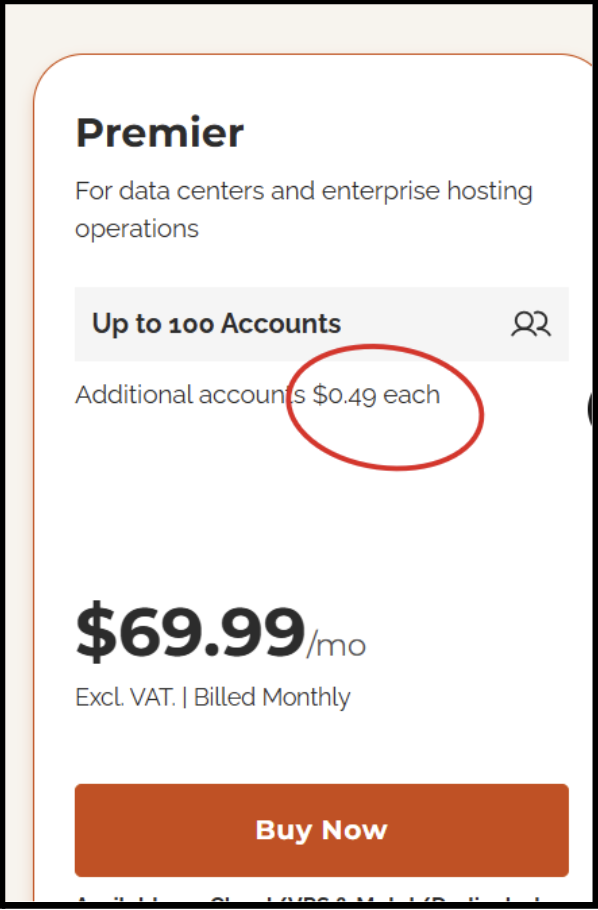
A dedicated Premier license lands near $69.99 per month before any add-ons.
Cost per account calculations
Run 200 accounts on a dedicated server.
- You pay about $69.99 plus 100 extra accounts at $0.49 each. That is roughly $105 per month, or $1,260 a year, for the license alone.
- Partner rates like these sit below retail. Buy direct as a single site owner.
Why Has cPanel Become So Expensive?
The price did not rise by accident. My team found five clear forces pushing cPanel costs up year after year.
Shift to Account-Based Billing
The per-account model is the main reason. Every new customer you add now bumps your license cost a little higher.
That changes the old logic.
Growth used to lower your cost per account, and this model turns growth into a rising bill.
The discount rules make it worse for small players. Big spenders now get up to 16% off, while tiny resellers lost their old 2% cut.
So the pricing quietly rewards buying in bulk. Small hosts and solo owners now carry the heaviest cost per single account.
Corporate Ownership Changes
Private equity now runs the show. Oakley Capital bought cPanel in 2019 and folded it into WebPros a couple of years later. These firms buy software with sticky customers, then lift prices steadily.
cPanel fit that playbook perfectly.
The same group owns Plesk too. When your only rival is your sister company, the pressure to stay cheap disappears.
Rising Development Costs
cPanel does point to real work behind the fees.
Security patches, new features and server tooling all cost money to build. Some of that is fair. Still, the product has not improved and the price has climbed up faster than the features.
Good security is fine. The real question is simple: should a control panel double in cost just to deliver it?
My team tracks each release. The updates are steady and useful, yet none of them explain a fifty-percent jump in seven years.
Market Dominance and Brand Power
For years cPanel had almost no serious rival. That gap let the owners raise prices with little fear of losing customers.
Customers were already trained on it. Switching means retraining staff and moving data, so most hosts just paid the higher bill.
That is the real thing here.
cPanel does not need to win on price when leaving it feels like a big project.
Increased Demand for Hosting Automation
Modern hosting leans hard on automation.
- Auto SSL, one-click apps, and cloud tooling all raise what a panel is expected to do. cPanel uses that demand to justify its tier structure.
- More automation on the roadmap becomes another reason to charge more.
Please Note
I run hosting brands myself, so this stings me too. I am giving you the plain math here, not trying to sell you cPanel.
Cloud growth feeds this too. As more sites move to VPS and cloud servers, cPanel positions its fees as the price of convenience.
How Rising cPanel Costs Affect Different Users
The pain is different for different users. Here is how the 2026 pricing hits each type of user I work with.
Shared Hosting Providers
Shared hosts pack many accounts onto one server. The per-account model punishes exactly that dense, low-margin setup.
A single busy server can cross into the bulk-fee zone quickly. Every hundred accounts over the cap adds a fresh monthly charge.
These hosts sell plans for a few dollars each. A rising license fee can quietly erase the profit on hundreds of accounts.
Reseller Hosting Businesses
Resellers feel squeezed from both sides.
Their own costs rise while clients resist any price bump. My team covers this in our cPanel reseller hosting guide. Thin margins leave little room. A yearly license hike can wipe out the profit on a whole batch of reseller plans.
Many resellers now cap accounts per server on purpose. They do it to dodge the bulk fees that kick in past 100 accounts.
Some resellers pass the cost straight to clients. That risks losing price-sensitive customers, so many quietly eat the hike instead.
Web Agencies
Agencies host client sites as a side service, not their core business. The rising fee quietly eats into project profit. Many agencies host thirty or forty client sites.
On the Pro tier that alone runs $32 per month per server, before add-ons.
For an agency, that is pure overhead. A free panel on the same server would hand that money straight back to the business.
VPS Users
VPS owners often need only a handful of accounts. Paying full cPanel rates on a small machine feels heavy. Our cPanel VPS hosting help here.
For a personal VPS with a few sites, a free panel usually makes far more sense than a paid Solo license. The Solo tier at $27.46 covers just one account.
That price feels steep when free panels handle dozens of sites at no cost. A free panel on that same VPS returns the whole license fee to your pocket.
For a hobby project, saving matters.
Dedicated Server Owners
Dedicated owners host the most accounts, so they hit the bulk fees hardest. Their license bill scales straight up with growth.
A packed dedicated box can pay over $100 per month in cPanel fees alone. That is pure overhead on top of the hardware.
Run 20 servers on the Pro tier and you cross $640 a month in license fees.
Real-World Cost Examples
Let me put real numbers on it. Here is what different operators actually pay per month under 2026 rates.
- Small host (30 accounts): Pro tier at about $49.46 per month.
- Medium reseller (100 accounts): Premier tier at about $69.99 per month.
- Large host (500 accounts): Premier plus 400 bulk accounts, near $0.49 per account.
Compared to pre-2019 pricing, that large host now pays over ten times more. The product did not get ten times better.
Hidden Costs of Using cPanel
The license fee is only the start. A real cPanel server usually carries a stack of paid add-ons on top.
My team added up the extras a typical shared host runs. The total climbs much higher than the sticker price suggests. People budget for the panel and forget the rest.
Then the first invoice arrives and the real cost finally shows up.
License Fees
The cPanel license itself is the base cost. Depending on your tier and server, that is $20 to $70 per month. Every account past your tier cap adds more.
This is the number most people quote, and it is only the floor.
CloudLinux Costs
Most serious shared hosts add Cloud Linux for account isolation. It stops one busy site from dragging down its neighbors.
Official CloudLinux runs around $7 to $18 per month per server.
It is close to essential on a packed server. So for most shared hosts, this is not really optional spending at all.
Skip it, and one runaway script can slow every site on the box. That risk is why hosts treat CloudLinux as core, not extra.
LiteSpeed Licensing
Hosts chasing speed swap Apache for LiteSpeed. It serves pages faster and handles heavy traffic with less strain.
A standard LiteSpeed license adds roughly $65 per month.
WordPress sites feel the biggest lift from it. That speed can trim page loads by a third, which clients notice fast.
JetBackup Add-ons
cPanel backups are basic, so many hosts bolt on JetBackup for proper remote and versioned backups. JetBackup v5 starts from free to $8.95 per month per server.
One lost server can end a hosting business overnight. So this fee is really insurance you hope you never have to use.
Security Extensions
Real protection often means adding Imunify360 or a similar security suite. That fights malware and blocks attacks at the server.
Each extra tool stacks another monthly fee. One by one they turn a cheap panel into a pricey subscription bundle.
Total Cost Example
cPanel Premier ($49.50) plus CloudLinux ($13), LiteSpeed ($15), and JetBackup ($18) lands near $95 per month per server. Stacked add-ons can push a full server past $80 to $100 every month.
This is the part people miss when they compare panels. The cPanel license is just the entry ticket, not the full bill.
Is cPanel Still Worth the Price in 2026?
So here is the honest question. After all these hikes, does paying for cPanel still make sense in 2026?
My answer is: it depends on you. Let me lay out both sides so you can judge your own case fairly. For some hosts, cPanel is still worth every dollar.
For others, it is money burned on habit. The gap is real.
Pros of Staying with cPanel
- Familiarity: your team and your clients already know the interface cold.
- Documentation: almost every hosting problem has a cPanel guide online already.
- Huge ecosystem: WHMCS, Softaculous, and thousands of tools plug in directly.
- Third-party support: nearly every hosting tool is tested against cPanel first.
Cons of Staying with cPanel
- Rising costs: seven straight years of increases, with more expected.
- Vendor lock-in: the whole industry sits under one parent company now.
- Expensive scaling: every new account adds cost instead of improving margin.
The scaling problem is the one that hurts most. The more your business grows, the more the license quietly takes from you.
When cPanel Still Makes Sense
cPanel earns its fee when you run a large, established host with clients who demand it. Some buy a cheap cPanel shared license to soften the blow.
For big operations, the ecosystem and staff familiarity can outweigh the cost. For everyone else, the alternatives now win.
Ask yourself one question. Do your clients truly need cPanel, or have you just never tried anything else on a test server?
Best cPanel Alternatives in 2026
Here is the part you came for. My team tested the leading panels, and these are the best cPanel alternatives worth your time.
Some are paid but far cheaper. Some are fully free. I have grouped the key strengths of each one for you. Every panel here can run email, sites, databases, and SSL. The real difference is price, speed, and how many servers you manage.
My team ran each one on a live server for a week. The notes below come from hands-on testing, not brochures.
DirectAdmin
DirectAdmin is the closest paid rival to cPanel. It is light, fast, and priced on a flat per-server model.
- Flat pricing that does not rise with your account count.
- Light on server resources, so smaller VPS plans run smoothly.
- Built-in LiteSpeed support across every license tier.
For most hosts leaving cPanel over price, DirectAdmin is the natural first stop. It feels familiar and costs far less.
My own teams run DirectAdmin on several boxes. The savings show up on the very first invoice, month after month.
CyberPanel
CyberPanel is a free panel built on OpenLiteSpeed. It is a favorite for fast WordPress hosting on a budget.
- Free open-source core with strong WordPress caching built in.
- OpenLiteSpeed delivers excellent speed for dynamic sites.
- Docker support and one-click SSL come standard.
One safety note from my team. CyberPanel had a serious flaw in late 2024, so stay on version 2.3.8 or newer.
With the right setup, CyberPanel rivals paid panels for speed. For a lean WordPress host, zero cost is hard to beat.
Plesk
Plesk is cPanel’s sister product and its main paid competitor. It bills per domain rather than per account.
- Runs on both Linux and Windows servers.
- Strong WordPress Toolkit and built-in security tools.
- Predictable domain-based pricing, though it also rose in 2026.
Plesk raised prices about 26% in January 2026, so it is no longer the cheap escape it once was.
Webmin/Virtualmin
Webmin with Virtualmin is a veteran free combo. It gives deep server control for admins who want the wheel.
- Completely free and open source in its GPL version.
- Handles almost any server task through its modules.
- Great for hands-on sysadmins comfortable with detail.
The interface looks dated, and beginners may feel lost. Power users, though, swear by how much it lets them control.
ISPConfig
ISPConfig is a free panel built for managing many servers at once. Larger hosts lean on it for that reach.
- True multi-server management from one dashboard.
- Reseller features and billing hooks included free.
- Battle-tested across millions of domains since 2005.
It carries a steeper learning curve and a heavier footprint. For a serious multi-server host, that trade is worth it.
HestiaCP
HestiaCP is a clean, free panel and a modern fork of VestaCP. It is my top pick for simple single-server setups.
- Fully free under GPL, with no paid gates.
- Excellent multi-PHP support and low resource use.
- Built-in Let’s Encrypt SSL and solid email tools.
It sticks to one server and skips Docker, and that is fine for most people. Low drama and zero cost win a lot of fans.
I run HestiaCP on my own test servers. It installs in minutes and asks almost nothing from the hardware underneath.
aaPanel
aaPanel is a free panel with a sharp, modern interface. It has grown fast and now powers millions of installs.
- Free core with one-click app installs.
- Switch between Nginx and Apache in one click.
- Light footprint, often under 100 MB of RAM idle.
Pro Tip
Test two or three panels on a cheap VPS snapshot before you commit. An hour of testing saves a painful migration later.
A few advanced plugins cost extra, though most people never need them. For beginners on a budget, it is a strong pick.
DirectAdmin vs cPanel: The Closest Alternative
DirectAdmin is the panel most cPanel refugees land on. My team keeps a full DirectAdmin vs cPanel breakdown, and here is the short version.
Pricing Comparison
This is where DirectAdmin pulls ahead. It charges a flat fee per server, so your bill stays flat as you grow.
- DirectAdmin Standard covers unlimited accounts for $29, while cPanel keeps billing per account.
- DirectAdmin also gives bulk discounts. Buy four or more Standard licenses and the price drops 15%, reaching 40% off at scale.
- Run one busy server and the gap is clear. cPanel bulk fees keep climbing, while DirectAdmin stays flat at $29 all month.
Over a full year, that gap adds up fast. A single busy server can save you several hundred dollars on licensing alone.
Performance Comparison
- DirectAdmin is lighter than cPanel. It uses fewer resources, so the same VPS feels faster and handles more traffic.
- cPanel is heavier by design. On small servers that weight shows, and DirectAdmin often wins the speed test.
Both run LiteSpeed for extra speed. DirectAdmin bundles support at every tier, which pairs well with an Nginx vs Apache setup.
User Experience Comparison
- cPanel still has the friendlier, more polished interface. Beginners tend to feel at home in it faster.
- DirectAdmin has improved a lot and looks clean now. The learning curve is small once you spend a day in it.
Your clients rarely care which panel runs underneath. They care that email, files, and sites just work, and both deliver that.
Migration Difficulty
- A move from cPanel to DirectAdmin is one of the easier switches. Automated tools handle most of the transfer for you.
- Accounts, sites, and databases move over with little fuss. Plan a test migration first, then cut over in a quiet window.
My team always pilots ten accounts before a full move. That catches surprises early, long before real customers notice anything.
Simple Migration Flow
Back up all accounts, spin up the new panel, restore a test batch, check email and SSL, then switch DNS during your quietest hours.
Backups matter here too. Take a full backup of every account first, so a bad transfer never costs you a client’s data.
Which One Wins?
For most small and mid-size hosts, DirectAdmin wins on price and speed. It does the core job for a fraction of the cost.
cPanel wins for large hosts who need its deep ecosystem. Your account count and client demands decide the tie-breaker.
Note For You
Under 100 accounts per server, DirectAdmin saves you real money every month. Over 500 accounts with heavy tool needs, cPanel can still justify its price.
Price is not the only factor, but it is the loudest. For most readers here, the cheaper panel is the smarter call.
Which Alternative Is Best for Different Users?
Every user has a different sweet spot. Here is my team’s quick recommendation by type, so you can skip the guesswork.
Match the panel to your real needs, not the marketing. The right free panel beats an overpriced license every time.
- A beginner on one VPS wants something simple, so HestiaCP or aaPanel fits best. Both install fast and stay out of your way.
- A web agency wants low cost and easy client handling, so DirectAdmin makes the most sense. Flat pricing keeps the budget calm.
- A multi-server host needs reach, so ISPConfig or Plesk earns its place. Both handle many servers from a single screen.
- A budget-focused user should skip paid panels entirely. CyberPanel and HestiaCP deliver the core job at zero license cost.
Frequently Asked Questions
Is cPanel free?
No! cPanel is not free. It is paid, licensed software that starts around $27.46 per month per server in 2026, and the price climbs with your account count. Free alternatives do exist. Panels like HestiaCP, CyberPanel, and aaPanel cost nothing.
Why did cPanel become expensive?
cPanel got expensive after 2019, when new private-equity owners switched it from flat pricing to per-account billing. Prices have risen every year since, over 55% in total.
Is DirectAdmin better than cPanel?
Yes! DirectAdmin is cheaper, lighter and uses flat per-server pricing, which beats cPanel for most small and mid-size hosts. cPanel is better for large hosts that need its bigger ecosystem.
What is the cheapest cPanel alternative?
The cheapest cPanel alternatives are free panels like HestiaCP, CyberPanel, and aaPanel. They cost nothing to license. Each covers email, databases, SSL, and one-click installs for most sites. For the cheapest paid option, DirectAdmin starts near $5.
Can I migrate from cPanel without downtime?
Yes, near-zero downtime is possible. Migrate accounts to the new panel, test them fully, then switch DNS during a quiet window.
Which free control panel is best?
HestiaCP is the best free control panel for simple single-server setups. It is clean, light, and truly free under GPL. CyberPanel wins for WordPress speed, and ISPConfig wins when you manage many servers at once. Match the panel to your workload.
Conclusion
So that is the full picture on cPanel pricing 2026, start to finish. We traced the whole journey together.
You saw the old flat-fee era, the 2019 shock, and the yearly hikes that pushed costs over 55% higher.
You saw why it happened: per-account billing, private-equity ownership, and a market with almost no rival to keep prices honest.
You saw the hidden add-ons too, from CloudLinux to LiteSpeed, that quietly push a full server past $80 a month.Free panels like HestiaCP and CyberPanel, plus cheaper paid ones like DirectAdmin, cover the same job.
You can even compare a stack with Nginx vs Apache to tune speed.
You also saw who should stick with cPanel and who should walk away. Large hosts may stay, while small hosts almost always save by switching.
The one habit I want you to keep is simple. Count your accounts per server before you renew anything, every single year.
My advice: audit your account count, then pick the panel that fits it. The same logic that guides best Squarespace alternatives applies here too.
Bonus Section: Quick Comparison Table
Here is the whole field on one screen. Keep this table handy when you sit down to make your final call.
That is everything my team learned, boiled down for you. Pick your panel, migrate with care, and your future invoices will thank you.
