
What is SaaS Management? The 2026 Guide from BetterCloud


TL;DR: The fast take on what is SaaS management
Here is the bottom line:
The definition:SaaS management is the practice of surfacing, tracking, securing, automating and/or optimizing every SaaS app, user, file, and dollar in your company
The risk:Gartner warns that by 2027, companies without centralized SaaS management will be 5x more susceptible to data breaches and overspend by at least 25%
The solution:Move away from manual processes and scripts to a SaaS management platform (SMP) to gain total shadow IT visibility and automate your unified asset management.
The win:You’ll stop paying for ghost licenses, eliminate orphaned accounts, lock down your data, automate repetitive work, and turn IT from a ticket-taker into a strategic powerhouse.
Because it’s never been easier to buy software, it often creeps in unseen and uncontrolled around your organization. As you scale, the sheer volume of users and Software-as-a-Service (SaaS) apps inevitably leads to chaotic SaaS sprawl where costs skyrocket, security gaps widen, and IT loses its grip. This is also where a SaaS management strategy becomes your best friend. But what is SaaS management and how does it help?
Stay with us as we unpack what is SaaS management and why it has become a critical discipline for IT, finance, and security teams today. In this article, we’ll cover:
- What is SaaS management
- Pain points driving the need for it
- SaaS management platforms and how they provide Shadow IT visibility and unified asset management for SaaS apps
- How to get started
What is SaaS management?
At its most fundamental, SaaS management is the art and science of proactively monitoring and wrangling the entire lifecycle of every SaaS application and user in your company. It has many activities and many stakeholders in your organization.
SaaS management is multi-disciplinary
Among its key functions, the approach covers:
- Discovery: Sniffing out every app in use, whether it was bought by the CTO or a summer intern
- Management: Keeping a firm IT hand on user access, permissions, and app configurations
- Automation: Saving time and money by reducing repetitive IT processes, and reclaiming unused licenses
- Security: Guarding the sensitive data living inside those apps and keeping auditors happy
- Optimization: Cutting the waste by right-sizing licenses and killing off unnecessary spend
When implemented effectively, SaaS management processes free IT teams from manual drudgery, reduce errors, shorten ticket queues, and allow them to focus on strategic initiatives that drive business growth. Such processes also ensure the SaaS solutions in your tech stack are active drivers of that growth, and not shelfware collecting digital dust.
It has multiple stakeholders
SaaS management extends beyond IT, too. So what is SaaS management to the rest of the company?
- For finance: No more unpleasant budget surprises or unplanned auto-renewals
- For security: Fewer vulnerabilities for hackers to exploit
- For employees: They get the tools they need to be rockstars on Day 1
Now that you’ve got an understanding of what it is, let’s back up and look at what’s propelling the need for SaaS management.
What’s driving the need for SaaS management?
The explosion of Software-as-a-Service (SaaS) companies has totally flipped the script on how we work.
Remember the old days? Some may not be old enough to remember, but software procurement used to be a months-long slog involving long deployments, physical servers and a mountain of IT tickets. Today, in 30 seconds, anyone with a corporate credit card can deploy the newest native-AI SaaS app with uncontrollable, usage-based pricing destined to blow the budget, leak data, or exploit security vulnerabilities.
Fragmented purchasing and sprawl of SaaS applications
While that agility is a SaaS superpower, it has created a messy, decentralized software world for IT.
According to the 2025 State of SaaS report by BetterCloud, the average enterprise now juggles about 106 different SaaS applications.
The shift has been so profound and enduring that Gartner predicts by 2028, over 70% of organizations will centralize their SaaS application management using a SaaS management platform SMP, a massive jump from less than 30% in 2025.
4 SaaS sprawl pain points
Without a centralized framework, the “best-of-breed” approach creates data silos and security is an afterthought. Your SaaS solutions can become a giant headache if left unmanaged.
To fix the mess, you have to understand the friction that unmanaged software creates.
1. The visibility gap and shadow IT
The biggest hurdle for IT teams is shadow IT visibility. Shadow IT, and its close cousin, Shadow AI are basically any software used in your company without IT’s blessing.
According to that same Gartner research, through 2027, organizations that fail to centrally manage SaaS lifecycles will remain five times more susceptible to a cyberincident or data loss due to incomplete visibility into usage and configuration.
2. Identity and access management chaos
When employees move on, you need to immediately pull the plug on their resource access. If your organization lacks unified asset management, this becomes a manual game. Even with the best and most comprehensive spreadsheet checklist, it’s impossible to be sure you’ve terminated access to all apps in a timely manner. This error-prone approach all too often leaves one forgotten app, which is an invitation for a data breach.
3. Operational turmoil and the manual work trap
Beyond the visible costs, unmanaged sprawl creates a silent epidemic of operational chaos. When SaaS solutions are disconnected, IT teams find themselves stuck in a manual trap. In fact, according to BetterCloud’s 2025 State of SaaS report, 60% of IT teams are currently trapped in a cycle of manual tasks—like password resets and access requests—that prevent them from ever touching strategic projects.
Without unified asset management, simple tasks like onboarding a new hire can take days instead of minutes, as admins manually create accounts across dozens of separate SaaS applications. This fragmentation doesn’t just frustrate employees; it leads to alert fatigue where critical security configurations are missed simply because the team is spread too thin.
4. The epidemic of SaaS waste
Let’s face it: unmanaged SaaS is a money pit. Without a centralized source of truth for your SaaS solutions, companies end up paying for duplicate apps, redundant accounts, and ghost licenses. Gartner also warns that organizations failing to coordinate SaaS lifecycles will overspend on SaaS by at least 25% through 2027 due to unused entitlements and unnecessary, overlapping tools.
Can you relate to any or all of these pain points?
If so, you’re ready to hear about SaaS management tools and what they can do for you.
What is a SaaS management platform?
As your list of SaaS applications skyrockets and user headcount grows, trying to track them in a spreadsheet is like trying to empty the ocean with a spoon. While manual processes or scripts offer partial solutions, a dedicated SaaS management platform is the emerging standard for managing your SaaS environment.
An SMP is your mission control and orchestration layer in the IT tech stack. It integrates with your entire stack of SaaS solutions to give you a single pane of glass for discovery, management, automation, and security. While tools like JumpCloud tell you who is logged in, an SMP tells you what users are actually doing once the door is open and provides the multi-SaaS orchestration functionality.

Management for SaaS app and user lifecycles
To truly answer the question, “What is a SaaS management platform?”, you must look at the lifecycle of an application – and of the user – within the business. Think of it as a journey, not a destination.
At a high level, here is the five-stage flow that every app should follow:
- Phase 1: Planning and selection: Before a new SaaS solution hits the stack, vet it! Does it meet security standards? Do we already own something similar?
- Phase 2: Discovery and inventory: This is where you gain shadow IT visibility. You’re looking for the apps that snuck in through the back door.
- Phase 3: Onboarding and provisioning: Automate the welcome wagon. Use your SMP to connect all SaaS apps and get new hires their tools on day one.
- Phase 4: Active management and optimization: The day-to-day work of watching usage, reclaiming licenses, and making sure the security gates stay locked.
- Phase 5: Offboarding and de-provisioning: The “big exit.” When someone leaves, you kill their access, move their files, and put that license back in the bank.
This process drives the functionality found in most leading SaaS management platforms.
The fundamental SaaS management functions
Of course, some SaaS management platforms are more comprehensive than others. At a minimum, you should look for a tool that provides the following key functions in an all-in-one platform.

1. Continuous discovery and shadow IT visibility
Static spreadsheets are where data goes to die. The discovery engine found in modern platforms changed all this. They hunt for new apps by integrating with several tools. This works via SSO integration by watching where people log in, financial discovery by spotting app charges on expense reports, and browser discovery by seeing which sites your team actually visits.
2. Workflow automation
Instead of wasting your time on manual tickets, orchestrate automated workflows for different IT processes. Let automation handle the never-ending help desk ticket resolutions and the cycle of adding new employees, making role changes, and terminating departures. This ensures that SaaS applications are instantly granted based on a person’s role and, more importantly, instantly revoked when they move on.
3. SaaS security, data governance, and compliance
The perimeter is gone; the data is everything. A robust SaaS management platform includes file security automation (finding files shared publicly), least privilege access (making sure people only see what they need), and sensitive data discovery using AI to find PII hiding in your SaaS solutions. In a nutshell, it uses automation to flag risky behavior, like public file sharing or sketchy third-party app integrations
Gold standard SMP BetterCloud simplifies automation.To do so, they include:
- a no-code workflow builder
- customizable templates
- hundreds of pre-built integrations
- 1000s of actions and triggers
4. Granular insights, spend optimization and vendor management
Don’t let your SaaS vendors dictate your budget. Take control by seeing if a user has a “Pro” license but hasn’t touched a “Pro” feature in three months. Reclaim licenses from people who aren’t using them and set alerts so you never get hit by a surprise auto-renewal again.
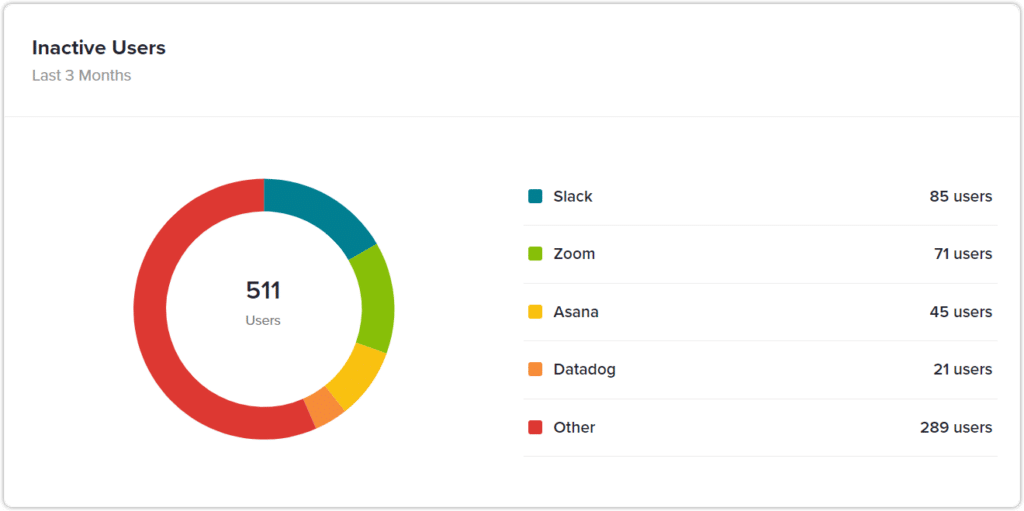
Top benefit: Unified asset management for centralizing SaaS solutions
To stop the fragmentation of your SaaS solutions, you need unified asset management. It’s the backbone of modern SaaS management that pulls all your data, from your identity provider to your finance systems — together like magic into one place.
Finally, IT gets a single view of all SaaS applications, contracts, vendors, users, licenses, usage data, files, and costs.
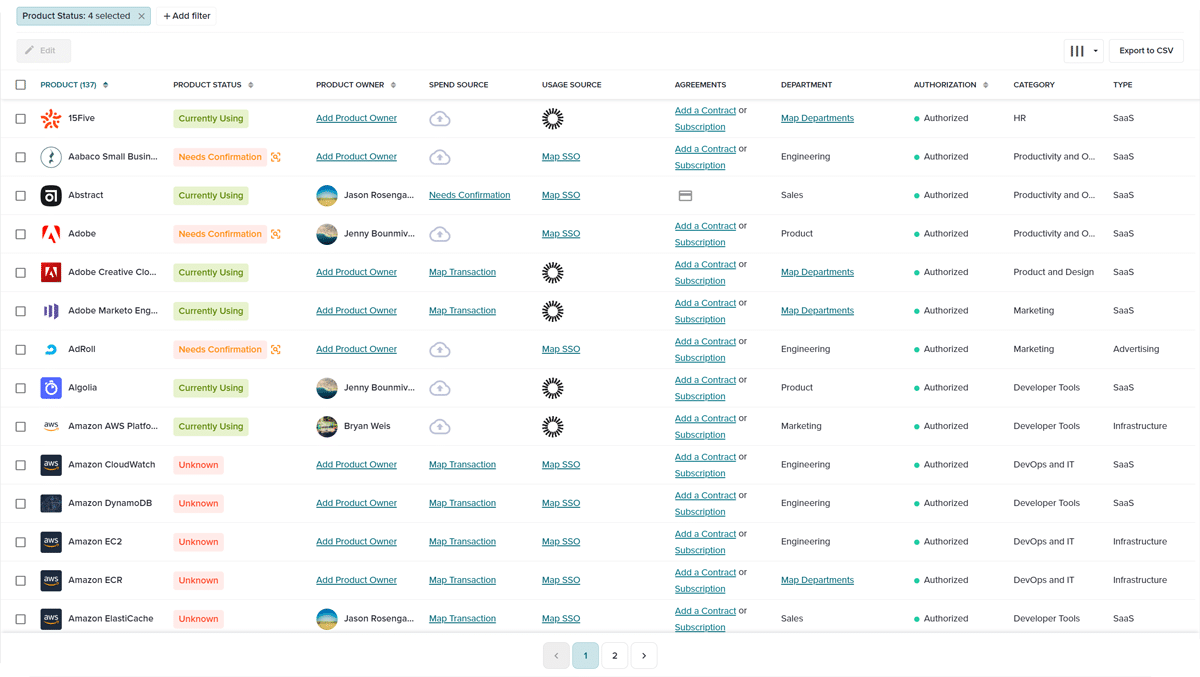
By centralizing this data, IT eliminates silos, enables informed decisions, and moves your team from being the “department of no” to the “department of know.” Unified asset management lets you see exactly what’s happening in real-time. It transforms a scattered pile of tools into a lean, mean, visible asset library.
“
BetterCloud has helped us automate the noise—busy work—so we can focus on value-added, strategic initiatives. It’s one of those tools you don’t realize how much you rely on until you try to work without it.”
– Michael Lockwood, Senior Analyst, Google Workspace Engineering, ScottsMiracle-Gro
Get started today: 6 practical steps for SaaS management success
Want to get your SaaS solutions under control? Here’s your plan to follow:
SaaS management: turns IT into a strategic partner
So, what is SaaS management? Ultimately, it’s the difference between an IT team that’s drowning in tickets and one that’s driving the business forward.
In 2026 and beyond, smart SaaS management increasingly includes AI. Thanks to AI, ingesting contracts into your SMP is already faster, more accurate, and less time-consuming for organizations. In the future, AI governance will help keep costs in check and lead to faster remediation. In a few years, we’re likely to see exciting developments in autonomous IT management. In fact, there may come a time when AI agents negotiate your contracts with Software-as-a-Service companies while you sleep.
By using a SaaS management platform with unified asset management, getting serious about shadow IT visibility, and playing smart with SaaS application vendors, you turn your tech stack into a powerful competitive advantage.
Make 2026 the year SaaS management gives you competitive advantage.
Ready for SaaS management? Schedule a demo with BetterCloud today and see why Gartner named BetterCloud a Leader in the 2025 Magic Quadrant™ for SaaS Management Platforms.
Editor’s Note: This article was updated from 2024 to include recent data and the latest SMP functionality.
FAQs on what is SaaS management
Q: Is SaaS management necessary if we use an SSO?
A: Even if you use an identity provider (IdP) like Okta or Entra ID, you still have blind spots. SSO tells you who can log in, but it doesn’t tell you what they’re doing once they’re in. Without a specialized platform, you can’t see if people actually use the expensive “Pro” features you’re paying for. Plus, shadow IT visibility remains a huge issue because many employees sign up for free or trial SaaS applications using their work emails without ever connecting them to your SSO.
Q: How much can we save with a SaaS management strategy?
A: The savings are usually substantial. Gartner research indicates that organizations without a centralized plan for their SaaS solutions often overspend by at least 25%. Between reclaiming licenses from departed employees and consolidating redundant tools (like having three different whiteboarding apps), most companies see a return on investment within the first few months.
Q: What’s the difference between an IdP and a SaaS management platform?
A: Think of your IdP (Identity Provider) as the “security guard” at the front door—it checks IDs and lets people in. A SaaS management platform is the “building manager.” It looks at the whole ecosystem: it tracks the budget, manages contracts with Software-as-a-Service companies, monitors data security within files, and optimizes how every license is used. You need both to have a truly healthy tech stack.
Q: Can’t I just manage our SaaS applications with a spreadsheet?
A: You could, but you probably shouldn’t. With the average company now using over 100 SaaS applications, a spreadsheet is out of date the second you hit “save.” Manual tracking leads to missed renewals, orphaned accounts (a massive security risk), and wasted money. A dedicated platform automates the heavy lifting so you can focus on strategy, not data entry.
Q: What is “Shadow AI” and why care?
A: Shadow AI is the newest frontier of shadow IT. It’s when employees use unvetted AI tools. Without visibility, your proprietary code or customer info could be used to train public models. SaaS management helps you spot these AI SaaS solutions early so you can set guardrails.
Q: How do I gain full visibility into all my SaaS applications?
A:. SaaS management platforms like BetterCloud are designed to give IT full visibility. From a single, centralized dashboard, you can:
- See every app in your environment
- Identify who is using each app
- Uncover which apps have been granted OAuth access
- Gain visibility into shadow IT
- Set up real-time alerts to notify you when employees log in to risky apps
- Automatically log employees out of risky apps
These insights help IT admins make strategic, informed decisions on what apps to use. With the data from your SMP, you can optimize your SaaS usage by uncovering potentially redundant apps, consolidating SaaS usage to save on license costs, and identifying functionality gaps in your SaaS portfolio
Q: What’s the best way to automate routine SaaS management tasks?
A:. We suggest the following steps to start with some automation basics:
When you have mastered the basics of workflow management, you can move towards a zero-touch IT model. Here are just two of the many ways you can save even more time with your SMP through automation. First, leverage custom triggers to create workflows that trigger from HR. For example, when someone is given a start date in an HRIS, it automatically kicks off an onboarding workflow in your SMP. Second, you can create self-service where users request SaaS app access through a form or ticket, and a workflow kicks off that automatically adds them.
Q: How do I mitigate SaaS security risks and protect sensitive data
A: To mitigate data security risks (and sleep better at night) we recommend using an SMP to:
Create and enforce IT security policies: An SMP should provide the tools you need to create and enforce your IT security policies, such as timely offboarding and sensitive data protection. With lifetime log retention, your SMP can help you prove you followed your policies, as well as investigate past incidents.
Q: How long does it take to make SaaS management effective?
A: Modern platforms are designed for speed. While legacy software used to take months to deploy, you can get initial shadow IT visibility and a view of your unified asset management dashboard within 24 to 48 hours. Once you connect your primary systems (like your IdP and Finance tools), the data starts flowing instantly.

