
The IT leader’s guide to managing shadow IT


Shadow IT has been a concern for companies ever since employees started using internet connections, but it’s become especially pressing over the past several years. Simply put, shadow IT is any hardware or software that hasn’t been approved by your central IT department. But despite its menacing name, shadow IT usually doesn’t enter the company infrastructure for sinister reasons.
When faced with tight deadlines and key responsibilities, employees may engage with technology that helps them work more efficiently. Maybe they’re organizing client data or editing a piece of content. They might not even be aware the app they’ve just downloaded is unapproved. But how do you know that unsanctioned app doesn’t expose the company to security risks? By the very definition of shadow IT, you don’t.
The pandemic-induced surge in remote work has significantly amplified the shadow IT challenge. Remote employees generally want to remain productive, but working outside headquarters, they’re more likely to bypass getting the IT department’s approval when using some unsanctioned app. There’s a good chance they’re unaware of the risks involved. But they could be using that unsanctioned app for file sharing purposes over Wi-Fi at a coffee shop or an airport lounge, leaving company data vulnerable to bad actors.
Fortunately, there are ways to reduce shadow IT usage and optimize user experience for your employees. BetterCloud is here to guide you through this rapidly evolving technology struggle.
What is shadow IT?
Shadow IT is any unapproved information technology that hasn’t been initiated by the IT department. Shadow IT occurs in various forms; of them all, apps are the most significant starting point.
The increase in shadow IT dovetails with the rise of SaaS (software-as-a-service) in the workplace: cloud-based apps like Slack, Mailchimp, and Zoom—to name a few commonly IT-approved examples.
Additionally, shadow IT includes blind spots like:
- Unsanctioned Accounts: Employees creating personal accounts to bypass company protocols, leading to data fragmentation and security risks. For example, let’s say one of your employees needs to file expenses from a business trip, but has lost the login info for the account assigned to them via corporate. They hurriedly file expenses with a new, unapproved account they’ve created on the spot. This could cause headaches for the expense department, or even expose company credit cards.
- Personal Device Usage: Employees using personal devices for work-related tasks without adhering to company policies, increasing the risk of data breaches.
- Unauthorized Integrations: Employees may take it upon themselves to reconfigure approved software and apply it in ways IT isn’t prepared for, perhaps to share files with a collaborator.
Another version of shadow IT has started to bubble up: Shadow AI. This new version of shadow IT carries the same vulnerabilities, but can be more prevalent as organizations continue to adopt new AI tools.
The why behind shadow IT
It might seem counterintuitive – employees going rogue and implementing technology without IT’s blessing. But understanding the motivations behind shadow IT is crucial for addressing it effectively. It’s rarely about malicious intent; more often, it stems from a desire to be productive, efficient, and simply get the job done in a world that moves at lightning speed. Let’s delve into some of the key drivers:
The need for speed and agility: In today’s fast-paced business environment, delays can be costly. Traditional IT procurement and deployment processes can sometimes feel cumbersome and time-consuming to end-users facing immediate needs. They might find a readily available cloud-based tool that solves their problem instantly, bypassing what they perceive as bureaucratic hurdles.
Frustration with existing tools and processes: Sometimes, the officially sanctioned tools simply don’t meet the specific needs of a team or individual. Perhaps the approved software lacks a crucial feature, is difficult to use, or doesn’t integrate well with other essential applications. Shadow IT can emerge as a way to bridge these gaps and enhance functionality.
Empowerment and innovation: Employees often have firsthand insights into their workflows and the tools that could optimize them. Shadow IT can be a manifestation of their initiative and desire to find better ways of working. They might discover innovative solutions that IT hasn’t yet explored or prioritized.
Ease of access and user-friendliness: The proliferation of user-friendly, often free or low-cost, cloud-based applications has made it incredibly easy for anyone to adopt new technologies. With simple sign-ups and intuitive interfaces, employees can quickly deploy tools without requiring specialized technical knowledge or IT intervention.
Lack of awareness or understanding of IT policies: In some cases, employees might not fully understand the organization’s IT policies or the potential risks associated with using unapproved software and hardware. They might simply see a tool that helps them and not realize the security or compliance implications.
Specific project or team requirements: Certain projects or teams might have unique needs that aren’t adequately addressed by the standard IT offerings. They might adopt specialized software or platforms tailored to their specific tasks, leading to shadow IT within a particular department.
Understanding these underlying reasons isn’t about condoning shadow IT, but rather about gaining valuable insights. By recognizing the drivers, IT departments can proactively address the needs and frustrations of their users, fostering a more collaborative environment and ultimately mitigating the risks associated with unsanctioned technology.
As threatening as this all sounds, shadow IT can offer unique opportunities for your company to innovate against your competition. We’ll explore the benefits of shadow IT in a bit, but first, let’s delve into the hazards.
The risks shadow IT introduces
A good IT department protects your company from security risks. Because shadow IT exists outside the IT infrastructure, an IT department can’t protect against threats it doesn’t know exist.
This lack of visibility opens the company to a cascade of risks that go far beyond a single insecure application.
Security vulnerabilities and data breaches
This is the most immediate threat. An employee could create an account with an unsanctioned app and—making matters worse—grant it access to sanctioned company apps like Dropbox and Google Docs. When this happens, the data from your secured apps is now exposed.
This is where the risks of OAuth really come into play. OAuth is open-standard authorization—aka, those speedy app sign-up procedures that “only” require passing along some personal information, like your Google or Facebook credentials. Let’s say an employee is in a rush to organize a set of client data, and signs up for a rogue app using their company email. Whatever that info was—home addresses, credit card numbers, etc.—is now vulnerable, along with swaths of other company data if a hacker was to get inside. Since that rogue app can’t be seen by IT, IT cannot track or disable it. Even if that employee is offboarded, the rogue app will remain within your network.
The data governance & compliance time bomb
For companies that need to adhere to data compliance regulations like GDPR, CCPA, or HIPAA, shadow IT is a ticking time bomb. The risks are severe:
- Data residency & sovereignty violations: Where is that shadow app’s data physically stored? An employee using a US-based app to handle EU citizen data is a direct violation of GDPR, carrying fines of up to 4% of global annual revenue. You are responsible for data you don’t even know you have.
- Broken data lifecycle management: Sanctioned systems have clear data retention and deletion policies. What happens to sensitive client data in a shadow project management tool when a project ends or an employee leaves? It likely sits there forever, a perpetual security risk and a violation of your own data governance policies. It’s impossible to apply a legal hold to data you can’t find.
- “Fourth-Party” risk: The risk doesn’t stop with the shadow app. That app has its own integrations (the “fourth parties”). Your data may not just be exposed by the rogue app, but by any of the other apps it connects to, creating a chain of invisible and untraceable risk.
The benefits of shadow IT
Pretty scary, huh? Well here’s the part where we let you in on a secret: shadow IT can actually give you a leg up on your competition.
When an employee seeks out information technology that isn’t already provided by the IT department, they’re sending you a message: I’d like to do my job more efficiently, and I’ve found a resource you didn’t give me which lets me do that. The vast majority of workers aren’t engaging with shadow IT for nefarious reasons; in fact, most of them are probably oblivious to the risks at hand. And without knowing it, they could be tipping off IT to something valuable that’s missing from the infrastructure.
A good IT department maintains a healthy dialogue with company employees; in this shadow IT scenario, that relationship is paramount. If employees feel kept in the loop with IT through instructional meetings about best practices, calls for feedback, and friendly, regular conversation, then shadow IT is much more likely to be turned into an asset. Maybe it’s an app, new to the marketplace, that performs a very specific task relevant to your workflow that one intrepid staffer has uncovered. Maybe a developer has found a way to expedite their workload when building outside the company’s internal channels.
Of course, a lot of shadow IT won’t be useful to your company at all. Some might present a bit of utility, but be far too risky to consider implementing. In order to sort this all out, you need to know what’s going on beneath the hood of your environment.
Using a SaaS management platform like BetterCloud, you can discover what apps are being used, and then optimize as best suited for your company.
Strategies for managing shadow IT
Effectively managing shadow IT requires a balanced, proactive approach that addresses technology, policy, and culture. Here are some key strategies:
- Enhance visibility and discovery: You can’t manage what you can’t see. The first step is always discovery. Implement a robust SaaS Management Platform (SMP) to get a unified view of your application landscape. This should be complemented by a broader technical ecosystem, including Cloud Access Security Brokers (CASBs) that can monitor and even block risky applications in real-time.
- Build a “paved road,” Not a wall: Instead of simply blocking unsanctioned tools, build an easy, well-supported path for employees. Create a curated, IT-sanctioned app catalog of pre-vetted tools for common tasks. When the approved project management tool is easy to request and deploy, there’s less incentive for an employee to expense a rogue one.
- Develop and enforce clear policies: Establish a comprehensive and easy-to-understand IT policy that defines what constitutes shadow IT. More importantly, create an acceptable use policy so employees know exactly what apps are permitted and have a clear, user-friendly process for requesting new ones.
- Foster collaboration and communication: Shift the dynamic from IT as a gatekeeper to IT as a business partner. Consider an “amnesty program” where employees can declare the shadow IT they use without penalty, giving you a massive data dump for immediate visibility. Embed IT business partners in departments to proactively find solutions before employees go rogue.
- Streamline the vetting process: A six-month security review for a simple app is why shadow IT exists. Develop a lightweight, rapid-assessment framework to approve or deny low-risk applications within days, not months. This shows you respect the business’s need for speed while still performing crucial due diligence.
- Provide training and education: Educate employees on the risks of shadow IT and offer training on approved tools and processes.
- Implement a robust SMP: A SaaS management platform with multiple discovery points can help IT uncover shadow IT on an ongoing basis.
Tips for managing shadow IT with BetterCloud
While a multi-layered strategy involving CASBs, network filtering, and cultural change is key, a powerful SaaS Management Platform like BetterCloud is the central hub for turning that strategy into action. It provides the core visibility and automation engine needed to discover, manage, and secure your application environment.
BetterCloud allows users to see what apps are living in their environment and their associated cost, as well as who is using them and what kind of access they have. All SaaS apps are completely detailed and categorized into a unified dashboard.
This includes shadow IT! When deciding which, if any, shadow apps you’d like to integrate into the company, BetterCloud lets you see who’s using that app, what credentials they have, and other crucial details.
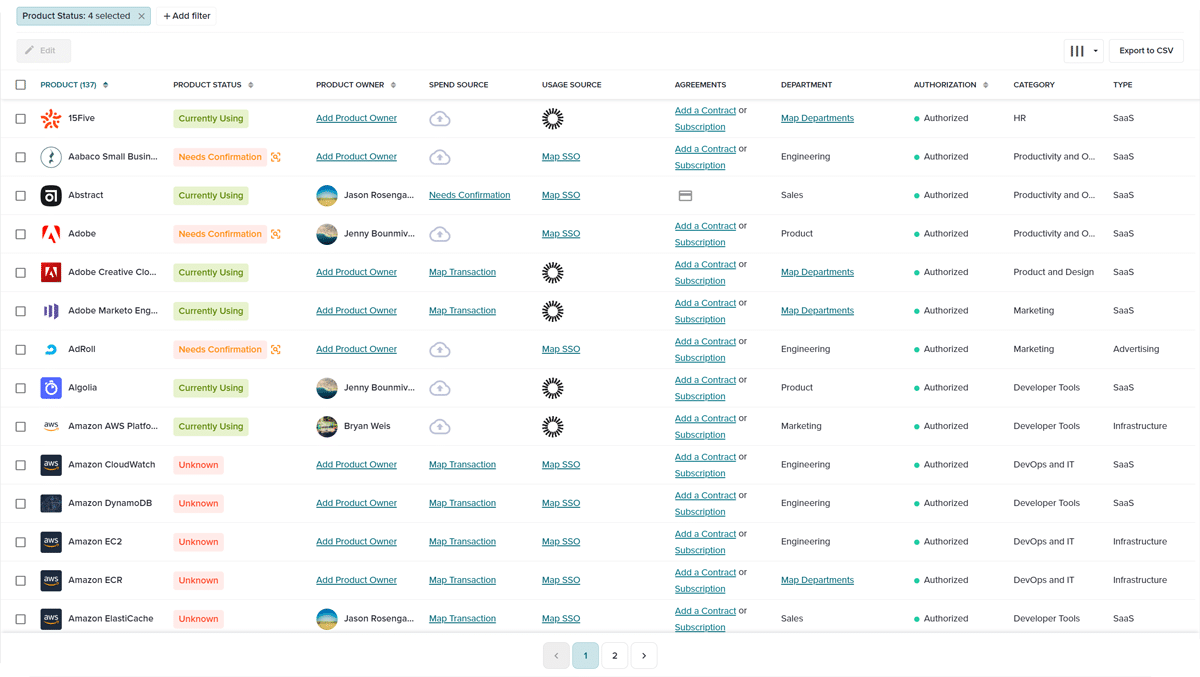
A key feature in this discovery process is the BetterCloud Chrome Browser Extension. This extension provides deep visibility into application usage across your organization by monitoring browser activity. It can identify not only which SaaS applications are being accessed, but also how frequently they are used and by whom. This allows IT to get a comprehensive picture of shadow IT and make informed decisions about which applications to sanction and which to block.
Remember all those scary statistics about shadow IT popping into your network undetected? BetterCloud creates alerts to notify IT whenever a new, unsanctioned app is discovered, allowing for real-time security measures.
BetterCloud also has your back in the struggle against OAuth, and the otherwise well-meaning employees who hand over credentials to unknown apps. Whenever a staffer uses company credentials to login to a suspect, third-party app, an alert is triggered, notifying IT. This alert kicks off an automated workflow, which logs the employee out of the app, and sends them an email getting them up to speed on the risk of using unsanctioned apps.
Fostering lines of communication is key for flipping shadow IT from a weakness to an asset. Well-meaning employees who engage with unsanctioned technology should not be made to feel intimidated by the IT department; they could wind up being the source of your next breakthrough!
Another great feature is the IT-sanctioned app catalog that can be used for self-service license requests. Whether employees enter the catalog within the BetterCloud platform or utilize the self-service agent, IT can rest easy knowing access can be granted into sanctioned applications, reducing IT burden. (Not to mention the other cool things, like automated password resets, that the self service agent can do!)
Using BetterCloud, your company can safely leverage new technology to innovate, stay competitive, and provide a great employee experience.
To learn more about how BetterCloud can secure shadow IT within your company and more, schedule a demo today.

