
How to automate file security in a SaaS management platform


Teams thrive on seamless file sharing, enabling work across global time zones. But such ease comes at a steep price: escalating SaaS security vulnerabilities. The core issue? SaaS apps prioritize ease of use to drive adoption, often risking sharing sensitive files via public links, exposing proprietary data, and resulting in costly breaches. This is why organizations of all sizes should automate file security in a SaaS management platform (SMP).
Zero-touch file security automation is a proactive strategy for detecting, mitigating, and preventing risks in real-time. Stay with us as we dive into everything you need to know about file security automation software capabilities in SMPs.
In this article, we’ll:
- Discuss the challenges that you can’t solve without automating file security
- Show how a SaaS management platform fits into your security stack
- Explain how to automate file security in an SMP
- Reveal essential zero-touch file security workflows that scale to millions of files
- Dive into how to take control of your SaaS files today
Whether you’re an IT admin, security lead or executive leadership, these insights will empower you to fortify your defenses without stifling productivity.
Mounting file security challenges: The unacceptable cost of failure
The SaaS explosion may be a big boon for productivity, but it’s also an unmanaged attack surface that hackers love. The manual approach to SaaS file security unfortunately leaves organizations ill-equipped to overcome common SaaS security risks. Organizations routinely face:
- The catastrophic IT workload: IT teams are overstretched, managing an ever-growing SaaS environment with shrinking resources. The workload pressure is intense: the ratio has climbed to 1 IT person for every 108 employees—a 31% spike in a single year, according to the BetterCloud State of SaaS 2025 report.
- Chronic file over-permissions: Manual reviews can’t prevent widespread over-permissions that plague every company, as 25% of files carry an unwieldy 5 to 35 sharing permissions, according to Unlocking a Safer SaaS Stack (2025), posing a severe risk.
- Overprivileged third-party apps: OAuth apps with “full read/write” scopes on Drive or OneDrive are still on the rise as organizations rush to adopt AI assistants.
- The insider threat: The greatest risk isn’t the external hacker; it’s someone you know. It could be an ex-employee you’ve failed to completely offboard. It could also be a well-meaning employee whose errors create security holes.
Over 70% of organizations cite the negligent employee as their biggest data loss risk, according to the BetterCloud SaaS Data Security Report 2021. This negligence again surfaced in the BetterCloud 2025 State of SaaS Report, which found that 48% of organizations experienced work emails sent to personal accounts, and 7% saw sensitive data publicly shared.
- The visibility catastrophe: Teams are essentially flying blind. While 76% of IT teams are responsible for safeguarding sensitive data, 45% openly struggle to secure user activity within those apps, according to the State of SaaSOps 2024 Report.
- The worst-case scenario of data loss: The most pressing file security challenge is overexposure. 53% of security-first IT teams rank sensitive files shared publicly as their top security concern, according to Unlocking a Safer SaaS Stack (2025).
The bottom line: manual efforts can’t keep up. Even dedicated security teams using native admin consoles drown in alerts. The only scalable answer is to automate file security end-to-end.
The strategic pivot: Automate file security in an SMP
Manual management is untenable in the face of AI-scale risk. The only way to automate cloud file security is through a centralized platform. Security leaders recognize that disparate, native security controls are futile. They are demanding unified governance. 70% of IT professionals prefer a unified platform to automate, manage, and secure their SaaS stack.
Even Gartner agrees that centralized control will be a standard practice. 70%+ of organizations are projected to centralize SaaS application management using a SaaS management platform by 2028, according to a projection cited in the 2025 Gartner® Magic Quadrant™ for SaaS Management Platforms.
One of the best parts of using an SMP to automate file security is its flexibility. Using workflows that are alert-based, you can adjust the actions you take and the order you take them in, based on the level of risk.
Additionally, an SMP can also be a crucial partner in the SaaS security stack. The SMP provides the non-negotiable cross-application visibility and policy enforcement engine required to truly automate file security.
Now, let’s take a step back and examine how an SMP integrates into your IT and security stack.
Where SMPs fit in the overall security stack
An SMP plays an important role in security because it acts as an end-to-end central control point for managing, securing, and optimizing SaaS applications across an organization.
Multiple file security automation software functions boost security
- Comprehensive visibility into both sanctioned and unsanctioned SaaS applications, enabling IT teams to discover shadow IT and shadow AI through multiple discovery methods such as SSO logs, financial data, OAuth tokens, and integration with identity providers and security tools.
This visibility allows organizations to map where sensitive data—such as PII, PHI, and intellectual property—resides within their SaaS ecosystem, which is critical for effective data governance and compliance.
- Automated user lifecycle management—both onboarding and offboarding—to help prevent data breaches by ensuring access is revoked when employees leave. An SMP generally supports least-privileged access models, reducing the risk of insider threats by limiting user permissions to only what is necessary. SMPs also help enforce compliance with standards like ISO 27001, SOC 2, and GDPR by providing audit-ready reports and secure, encrypted data storage.
- Ability to trigger workflow across multiple apps, to handle tasks like across that include more than one app. For example, a workflow can trigger when a sensitive HR file is uploaded to Slack, then execute tasks like delete the message, notify security, and then create a Jira ticket.
- Ability to identify overexposed files and enforce policies, including revoking permissions, or locking files to prevent data leaks. Regular audits of external sharing links and broad permissions (e.g., “anyone with the link”) help reduce the risk of unauthorized access, especially in regulated industries handling PII or financial data.
In addition, it can execute workflows like:
- If a Google Drive file is shared externally, then notify the owner or revoke link.
- If a folder is created in a restricted workspace, then label it as confidential.
SMPs integrate well with other SaaS security tools
While SMPs focus on application management, user access control, and governance, they often integrate with other security tools. To follow security best practices, most organizations use Identity Provider (IdP) systems. In addition, some also use Security Incident and Event Management (SIEM) platforms, SaaS Security Posture Management (SSPM) and Cloud Access Security Brokers (CASBs) to create a cohesive security posture.
SaaS security stack architecture

For instance, pairing an SMP with a SSPM tool enables proactive threat detection and configuration monitoring across the entire SaaS environment. Although CASBs offer very advanced data loss prevention (DLP) and threat protection for both SaaS and on-prem applications, SMPs complement them by providing administrative control, centralized management of SaaS applications and users, and file governance capabilities.
CategoryRole
CASB / SSPMDeep security visibility & control across SaaS
DLPFile scanning, sensitive data detection
SMPSaaS automation + some security workflows
SOAR/SIEMOrchestration and automated incident response
In practice, SMPs are usually used alongside tools like IDaaS, ITSM, and CASBs, forming a layered defense strategy that combines visibility, governance, and enforcement across the SaaS stack. This integration allows IT teams to manage SaaS usage, spending, file security, and compliance from a unified platform, significantly improving efficiency and reducing risks related to human error.
But because SMPs are flexible, some organizations choose to automate file security using alert-based workflows completely within the SMP itself. This approach is useful for companies that don’t want to implement security controls that are so restrictive it diminishes user productivity.
How to automate zero-touch file security with a SaaS management platform
Even though only a few SMPs include specialized file security automation software capabilities, SMPs shine with their powerful workflow automation using SaaS APIs to improve file security. Initially deploying automation for file security requires several steps that organizations implement over time.
This section details the critical process steps—the “how-to”—for achieving zero-touch file governance. But before you can set an SMP to take any automated actions, you first need to locate the file security risks in your SaaS environment.
Step 1: File discovery & inventory
- Connect every file-sharing app via API. This includes all cloud file storage like Google Drive, OneDrive, SharePoint, Box, Dropbox, Slack saved files, etc.
- Run baseline scans across all files, which the right SMP could reviews millions of files in hours.
- Prioritize your biggest problems, like which are the folders with the most external shares, or which files contain the most sensitive information.
Step 2: Sensitive data classification
While most organizations will already have defined what they consider to be sensitive data, to maximize the value of automating file security in an SMP, data should have multi-layer classifiers to determine if a file is high-risk. This includes:
- PII, PHI, PCI, GDPR special categories
- Custom regex, like API keys, JWT tokens, internal project codenames
- Proprietary data like trade secrets, source code, financial models
- Contextual words like files named “passwords.xlsx” or stored in /Backup folders
Pro tip: To avoid getting overwhelmed and delaying deployment, start with 10 high-impact classifiers, and add to it over time.
Step 3: Security policy in SMP
Most organizations already have a written security policy, but it may need to be adapted to translate well into automated workflows.
For instance, it’s best to use written policies in plain English that equate directly to automated actions. For example:
Policy ExampleTriggerAutomated Action
No credit card data public sharedFile with 15+ digits with public linkAuto-unshare, notify owner and manager
All external file sharing links expire after 7 daysExternal link older than 7 daysRevoke and send renewal link to file owner
File access revocation upon user departureUser status changed to inactive in IdP or directoryEnd access to all shared drives, transfer file ownership to manager
Step 4: No-code workflows
Cutting-edge file security automation software like BetterCloud lets you create workflows using simple, no-code, drag-and-drop builders. One example workflow for automating file security could be:
1. Trigger: New external share of high-risk file
2. Delay: 5 minutes to give user time to change file sharing permissions
3. If no change, then automatically make sharing internal-only
4. Notify user via Slack/Email with a one-click “Re-share safely” button
5. Notify manager if repeated offense
6. Log everything for SOC 2 audit
Step 5: End user security training
Automating file security should not be punitive to the user. A good rule of thumb is to pair every corrective action with a training message. For example, instead of just automating file access, you could include an automated warning like: “This file appears to contain social security numbers, so public links are removed. View this page to learn how to securely share next time.”
Step 6: Zero-touch automations for file security
Over time, gradually increase more and more automated remediations. Aim to have 40% of remediations fully automated by month 3, 70% by month 4 to 90% by month 6. While some files will require manual review from time-to-time, most organizations can easily automate most remediations.
Step 7: Monitor, report, iterate
Every IT and security team member should regularly measure the number of files your SMP auto-remediates every week. In addition, teams should aim for a fast Mean Time to Repair (MTTR) of less than 5 minutes for high-risk files, monitors users who routinely share risky files with public links, and be prepared to show ROI from automating file security (hint: estimated savings from breach avoidance).
Automate file security with 5 essential workflows
Once an SMP is in place, every organization should develop, run, and refine these 5 workflows that automate file security within an SMP. The best part about these workflows is that they don’t require IT or security teams to do anything manually — unless you choose for an IT follow-up to be part of the remediation process.
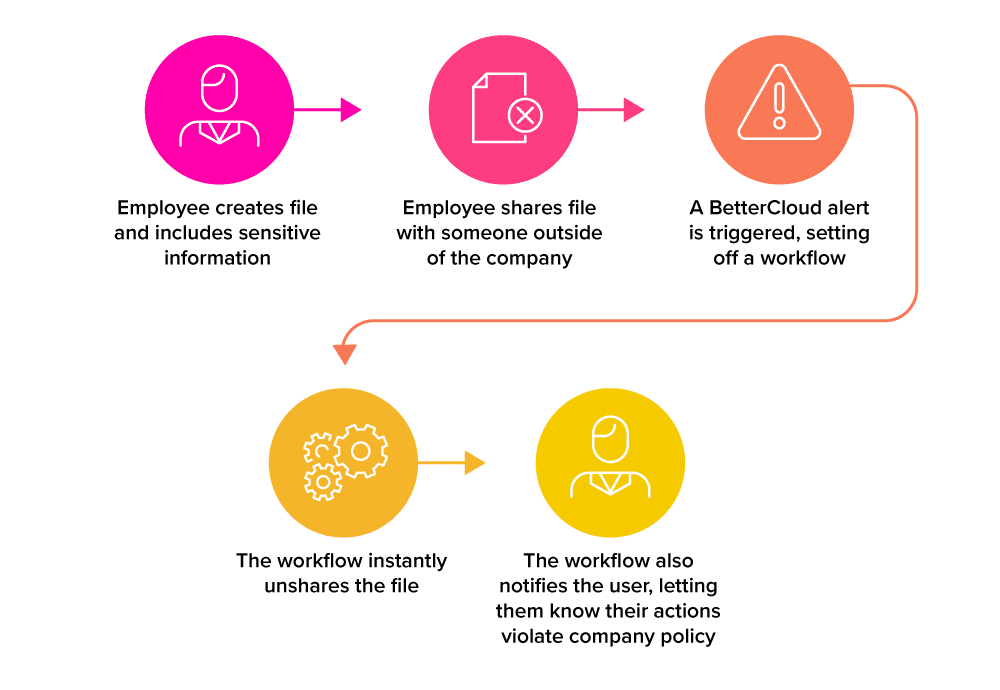
1. Public file sharing revocation
Once a file becomes publicly accessible or shared outside the organization, a workflow triggers to:
2. Orphaned file and departed user access prevention
After a user’s status is changed to inactive, trigger a workflow to:
3. Automatically clean up sensitive data in Slack
If a Slack message contains a file with sensitive content as identified by SMP’s DLP, Slack’s DLP, a CASB, or a regex trigger, then automatically run a workflow in an SMP that:
4. Weekly external collaborator sharing permissions cleanup
As a part of routine best practices for secure files in cloud storage and within key apps, schedule a weekly workflow to check files with external collaborators to:
5. Automated clean-up of shared files with credit card numbers
An alert notifies IT whenever a file contains a sequence of digits like a credit card number. A workflow can automatically trigger as soon as the file is detected to:
Take control and automate file security in an SMP now
Automate file security in an SMP now or explain later why you didn’t.
Done well, your SaaS environment becomes self-healing over time. Users learn to give less risky file access, files get unshared without any IT involvement, and your SaaS security posture improves.
Ready to see how to automate file security with an SMP in your environment? SMPs like BetterCloud make it painless to start. Act today with a 21-day free trial. In no time, you’ll get instant insights on your file environment, identify risky sharing behaviors among your first 100,000 files, and test automated file sharing workflows that reduce risk.
Instead of hoping that employees share responsibly, let self-healing, zero-touch file security automation do the work. Your organization and data deserve more than just hope.
Join the next BetterCloud live product demo or get a personalized demo now.
EDITOR’S NOTE: THIS IS AN UPDATED BLOG ORIGINALLY WRITTEN IN 2022
FAQs on automating file security with an SMP
What is automated file security, and why aren’t manual checks sufficient?
Automated file security is the practice of using a central policy engine (like an SMP) to continuously monitor, detect, and automatically remediate security and compliance risks across all your cloud file-sharing applications (e.g., Google Drive, OneDrive). Manual checks fail because no human can track the 5 to 35 permissions on 25% of all files, especially when IT teams are already stretched thin.
How does a SaaS Management Platform (SMP) fit into file security?
An SMP acts as the non-negotiable central control point for file security. It consolidates visibility across all your SaaS applications, allowing you to apply consistent security policies and automation workflows (e.g., “If file contains PII and is shared publicly, then unshare”) from a single dashboard. This addresses the visibility gap that native SaaS tools leave open.
What is the biggest risk that file security automation addresses?
The biggest risk addressed is internal negligence and over-permissioning. Over 70% of organizations cite the well-meaning but negligent employee as their biggest data loss risk. Automation prevents this by instantly revoking excessive permissions or remediating files shared to personal accounts, preventing sensitive data from leaving your secure perimeter.
How does automation integrate with Data Loss Prevention (DLP)?
Automation operationalizes DLP. Instead of just generating an alert when PII is detected in a file, the SMP’s automation engine uses that DLP flag as a trigger. For instance, the system executes an automated workflow: IF DLP classifies the content as PCI THEN revoke the sharing link immediately.
What are the best practices for enforcing least privilege access (LPA) on files?
Best practice is to use continuous, automated auditing. You must automate the process of finding and removing dormant or excessive permissions. Since 25% of files carry an unwieldy 5 to 35 sharing permissions, continuous automation is the only way to adhere to LPA and uphold Zero Trust principles at the file level.
How does automated file security ensure compliance with regulations like GDPR or HIPAA?
It provides instant and auditable controls. The SMP ensures compliance by automatically applying policies that restrict access to sensitive data (like PII or PHI) upon detection. This provides a clear, time-stamped audit trail of every automated remediation action, turning compliance from a manual burden into an always-on function.
How does an SMP fit into our existing security stack with a SIEM or SOAR?
The SMP serves as the SaaS orchestration layer. While your SIEM/SOAR manages overall threat response, the SMP integrates by feeding high-fidelity alerts on file security policy violations and executing the remediation action directly within the SaaS application. This allows your security operations center (SOC) to maintain oversight while delegating the repetitive enforcement work to the SMP.
Can automated file security help with employee offboarding?
Yes, it is critical for offboarding. An SMP ensures comprehensive file security by automating the workflow that transfers ownership of a departing employee’s files to their manager, simultaneously revoking all their access rights. This prevents data from becoming orphaned or inaccessible.
How is an SMP different from native security tools or a CASB?
Native tools only provide visibility and controls within their single application. CASBs (Cloud Access Security Brokers) primarily focus on traffic monitoring and perimeter defense. An SMP, conversely, focuses on SaaS-to-SaaS automation and orchestration, enabling you to execute proactive policy changes and automated remediation across your entire, fragmented SaaS stack from one location.
What is the difference between an SSPM and an SMP?
An SSPM (SaaS Security Posture Management) tool focuses narrowly on the security configuration of the application itself (e.g., checking if MFA is enabled for all admin accounts). An SMP offers a broader, more comprehensive approach that includes SSPM functions but extends into automated workflow orchestration, user lifecycle management, spending optimization, and most importantly, deep file and data governance across the entire portfolio. For automated file security, the SMP’s ability to take action (unshare, revoke access) is key.

