
8 Best Landing Page Builders [Buyer’s Guide]

A landing page builder is software that lets you create, publish, and host standalone pages focused on a specific goal, such as a signup, lead capture, or purchase.
This list, written for marketers and teams who need to launch custom landing pages without waiting on a developer, covers three kinds of tools: dedicated builders (Instapage, Leadpages, Unbounce, Landingi, Carrd, and involve.me), an email marketing platform with a built-in page builder (Kit), and one website builder (Wix).
Crazy Egg doesn’t offer a dedicated landing page builder, so I had no vested interest in promoting one tool over another. I compared all eight on their editors, templates, AI, A/B testing, analytics, integrations, domains, and plan limits, using my experience testing SaaS tools, vendor documentation, plan terms, G2 reviews, and Reddit discussions.
8 Best Landing Page Builders Compared at a Glance
Prices and plan details are accurate as of November 2026.
How I Chose These Landing Page Builders
To pick the tools for the roundup, I looked at seven areas:
- Ease of use. How intuitive the editor is.
- Templates and AI. The template library size and AI page generation.
- A/B testing. What you can test and which plan unlocks it.
- Analytics and reporting. What the tool reports natively, and what needs Google Analytics or another tool.
- Integrations and forms. Native connections to email, CRM, and ad platforms, plus forms, popups, and payments.
- Hosting, domains, and publishing. Custom domain rules, and options such as a WordPress plugin or HTML export.
- Free plan and limits. Free plans or trials, and the limits that force you to upgrade, such as visitor or page caps, branding, and custom domains.
To narrow down the tool selection, I read the vendor’s product pages, help center documentation, and pricing page, and checked recent G2 reviews and Reddit discussions. Then I tested each tool that made it to the roundup.
What is the Best Landing Page Builder?
1. Instapage: Best for paid ad teams
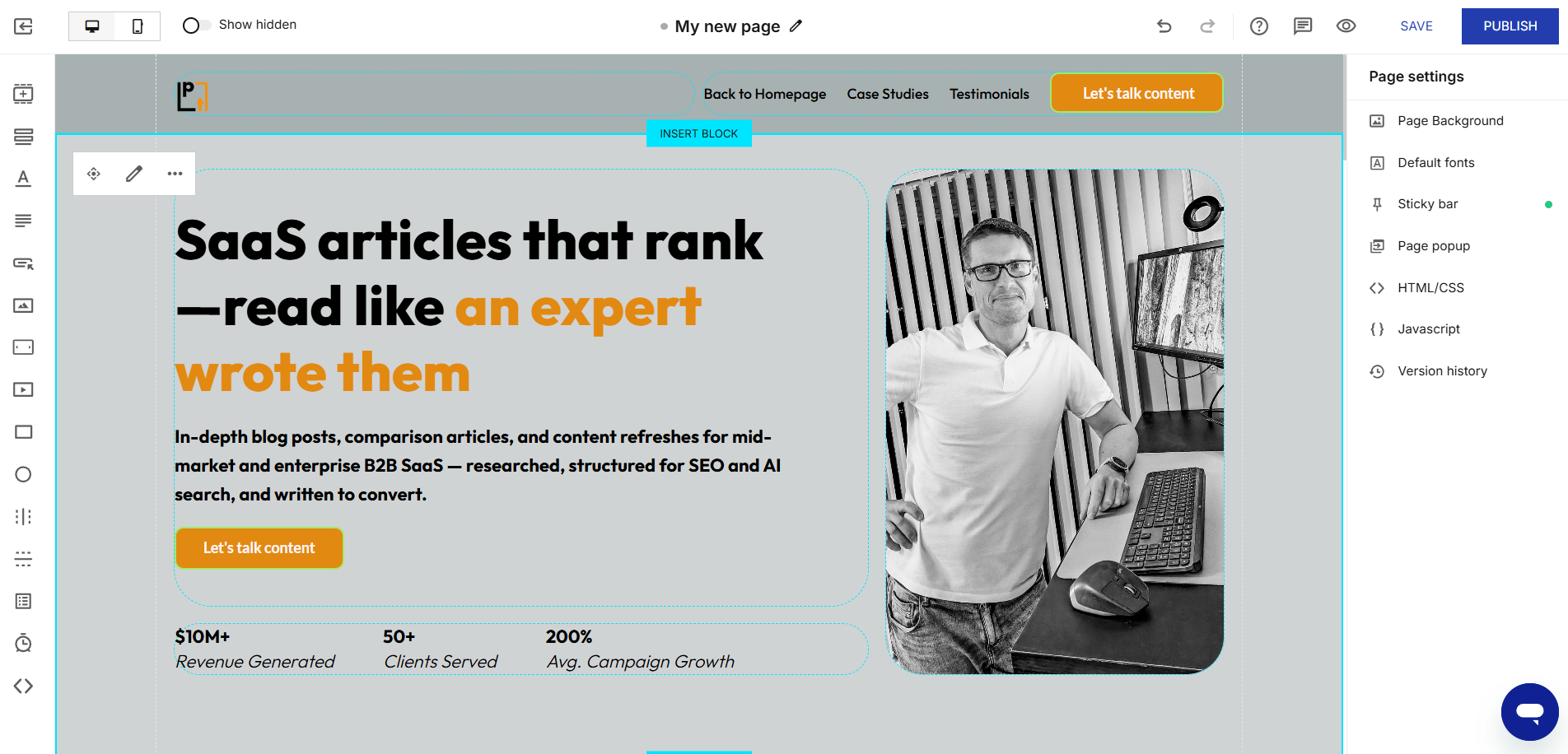
Instapage builder gives you a free-form canvas and responsive, reusable blocks, separate desktop and mobile views, and real-time commenting for easy collaboration.
Its “Prompt to Page” feature (in beta) builds a page from a prompt and reference images.
Instapage’s ad features include dynamic text replacement from URL parameters (on the Optimize plan and higher) and AdMap, which connects Google search ads to specific pages (on Convert).
It connects natively to Google Analytics 4, Google Tag Manager, Meta Pixel, and Google Ads.
Instapage A/B testing and analytics
Server-side A/B testing starts on the Optimize plan. The Convert plan adds AI Experiments, which automatically shift traffic toward higher-converting variations, and click, scroll, and mouse-movement heatmaps.
Native reports are limited. They show visitors, conversions, conversion rate, cost-per-visitor, and cost-per-lead. They sum all conversion goals into one count, though, so you can’t see which element produced them.
Instapage pricing
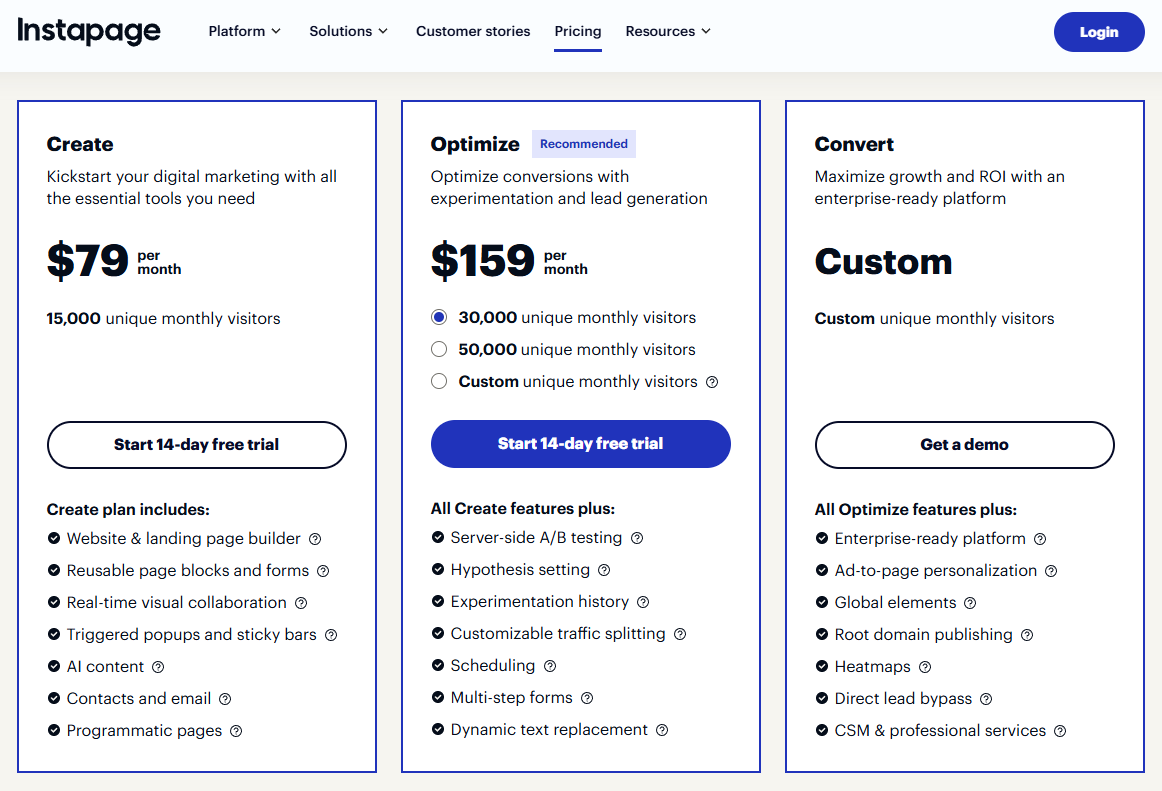
- Create: $79/mo ($99 monthly)
- Optimize: $159/mo ($199 monthly)
- Convert: custom pricing
There’s no free plan, just a 14-day free trial on Create and Optimize (card required).
What users say about Instapage
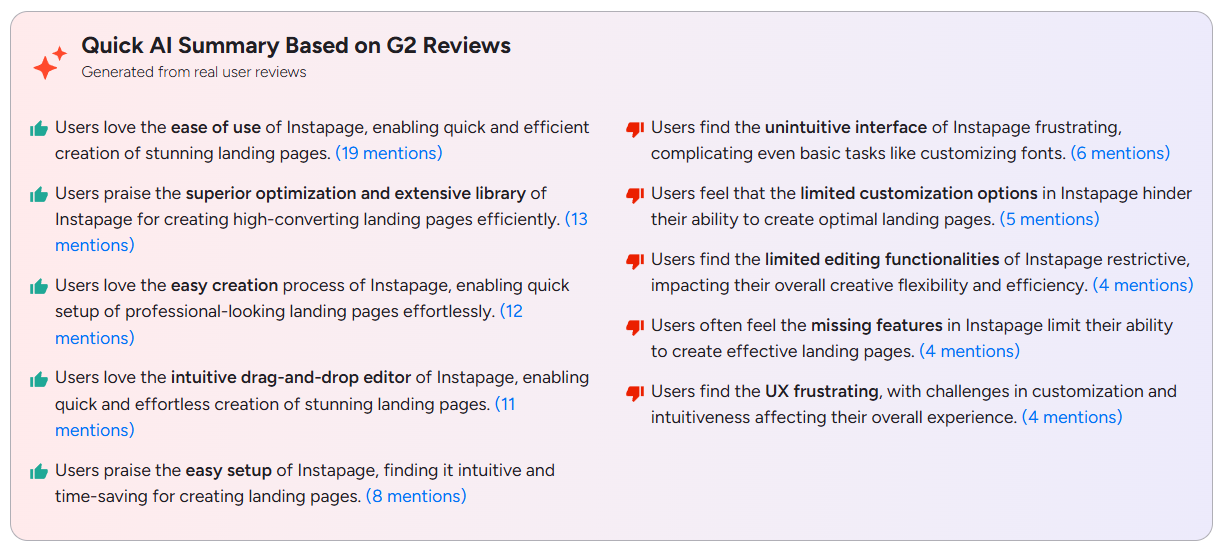
Instapage has a G2 rating of 4.3. Users rate it highest for ease of use, the drag-and-drop editor, quick setup, optimization tools, and extensive template library.
Recurring complaints concern an unintuitive interface, even for basic tasks like changing fonts, and limited customization and editing options.
2. Leadpages: Best for testing without extra tools
Leadpages has a visual editor with responsive desktop, tablet, and mobile previews.
AI page creation is available on every plan: you describe the page, and it builds one in about 60 seconds using your Brand Kit. The chat agent also helps with later edits.
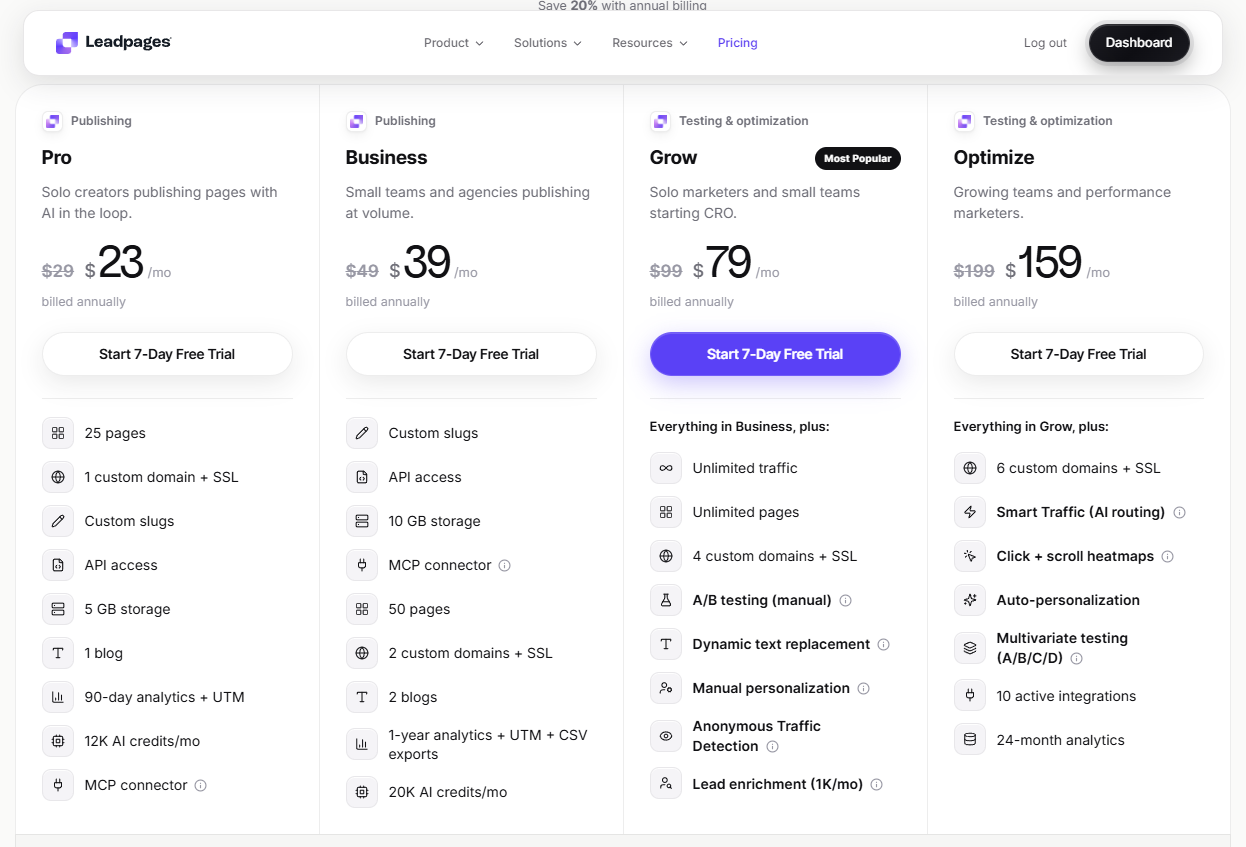
Personalization, with dynamic text replacement and audience targeting, is available from the Grow plan, and Optimize adds auto-personalization by source, device, and CRM stage.
Integrations include HubSpot, Salesforce, Mailchimp, Google Ads, and Zapier, so you can easily plug into your existing tech stack. For payments, there’s Stripe.
Leadpages A/B testing and analytics
A/B testing starts on the Grow plan. You can test up to six variants per page, with 50/50, 70/30, or custom splits. It labels results as leaning, likely, or clear, and you pick the winner.
The Optimize plan adds multivariate tests and Smart Traffic, which routes visitors to the better variant by device, source, and new vs. returning visitors, and promotes a winner automatically at 95% confidence. There’s also an Optimization Score, which grades each page from A to F and turns its ranked fixes into A/B tests.
Analytics reports cover views, unique visitors, conversion rate, bounce rate, device, and traffic source. On Optimize, you also get click, scroll-depth, and attention heatmaps inside the editor, but not for the A/B test variants.
Leadpages has no session recordings.
Leadpages pricing
- Pro: $23/mo ($29 monthly)
- Business: $39/mo ($49 monthly)
- Grow: $79/mo ($99 monthly)
- Optimize: $159/mo ($199 monthly)
There is a 7-day free trial (card details required), and no free plan.
What users say about Leadpages
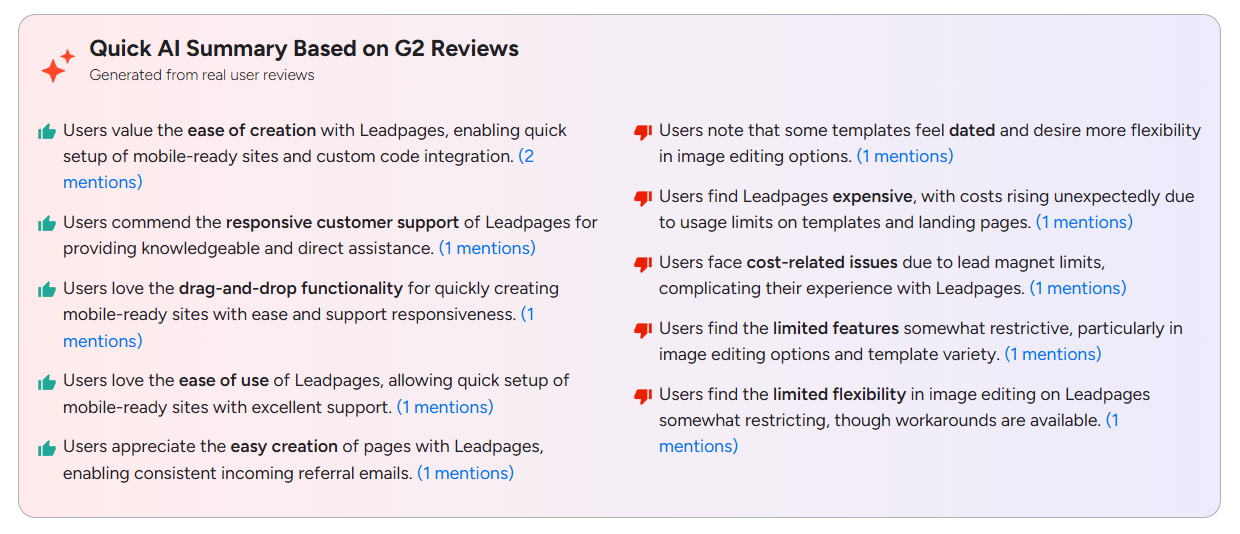
Leadpages has a G2 rating of 4.3.
Reviewers rate Leadpages for ease of creation, drag-and-drop editing, mobile-ready pages, and responsive support.
The key concerns are costs rising with usage, limits on pages and lead magnets, dated templates, and limited image editing.
3. Unbounce: Best for paid campaigns with traffic routing
Unbounce’s new AI Hybrid Builder lets you start from an AI prompt, a template, or a blank page, and edit with AI, by hand, or both.
It offers a tablet view, automatic conversion goals, and a built-in HTML editor.
The Hybrid Builder replaces the Classic Builder and the earlier Smart Builder, which supported popups, sticky bars, multi-step forms, conditional logic, file upload, payment and signature fields, and version history. So you can’t build them, at least, for now!
As in other premium landing page builders, you get dynamic text replacement, which swaps headlines based on a URL parameter (on the Experiment plan and above).
Integrations include Salesforce, HubSpot, Mailchimp, Zapier, and webhooks, and hosting is free on all plans.
Unbounce A/B testing and analytics
A/B testing starts on the Experiment plan and works on Hybrid Builder pages. You set the traffic weights yourself, and the Test Center shows a confidence rating.
On the Optimize plan, Smart Traffic analyzes variant performance across different audiences and sends visitors to page variants most likely to convert. It routes by location, device, browser, operating system, and time zone. Unfortunately, it works on custom domains only, and restarts learning after any edit or republish.
Native Unbounce analytics reports show visitors, views, conversions, and conversion rate by variant, with CSV export, and a variant_id event lets you analyze variant performance in GA4.
Unbounce has no heatmaps or session recordings, so you need a third-party tool like Crazy Egg to see how visitors behave on each variant.
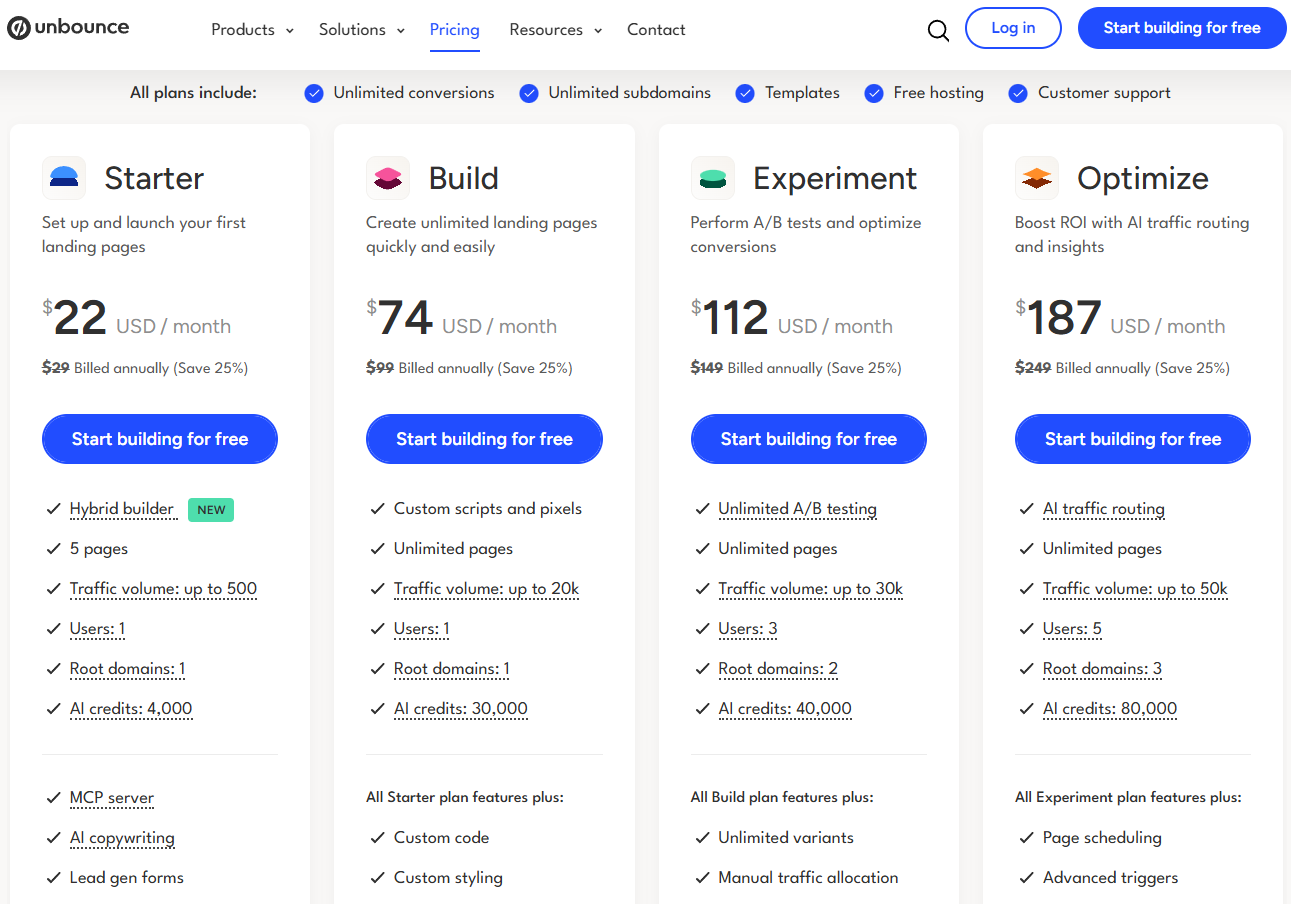
Unbounce pricing
- Starter: $22/mo ($29 monthly)
- Build: $74/mo ($99 monthly)
- Experiment: $112/mo ($149 monthly)
- Optimize: $187/mo ($249 monthly)
- Concierge and Agency: custom pricing
There is a 14-day free trial with no card required, but no free plan.
What users say about Unbounce
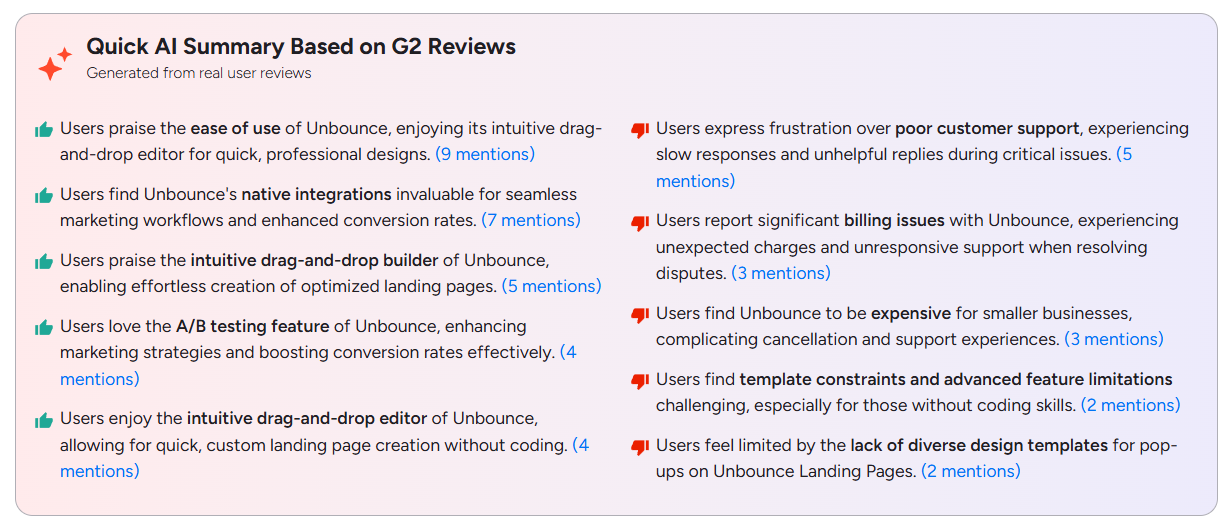
Unbounce has a G2 rating of 4.3.
Satisfied reviewers mention ease of use, the drag-and-drop editor, native integrations, and A/B testing as key Unbounce strengths.
Slow support response times, unexpected charges, a high price for smaller businesses, and limited templates, especially for popups, are the biggest complaints.
4. Landingi: Best for teams running multiple pages
Landingi is a landing page creator that lets you build and manage dozens of pages.
You can create landing pages in bulk from a CSV file or an API, and swap in text from URL parameters. Smart Sections let you save a section once and update it on every page that uses it with a single publish (on Optimize and higher).
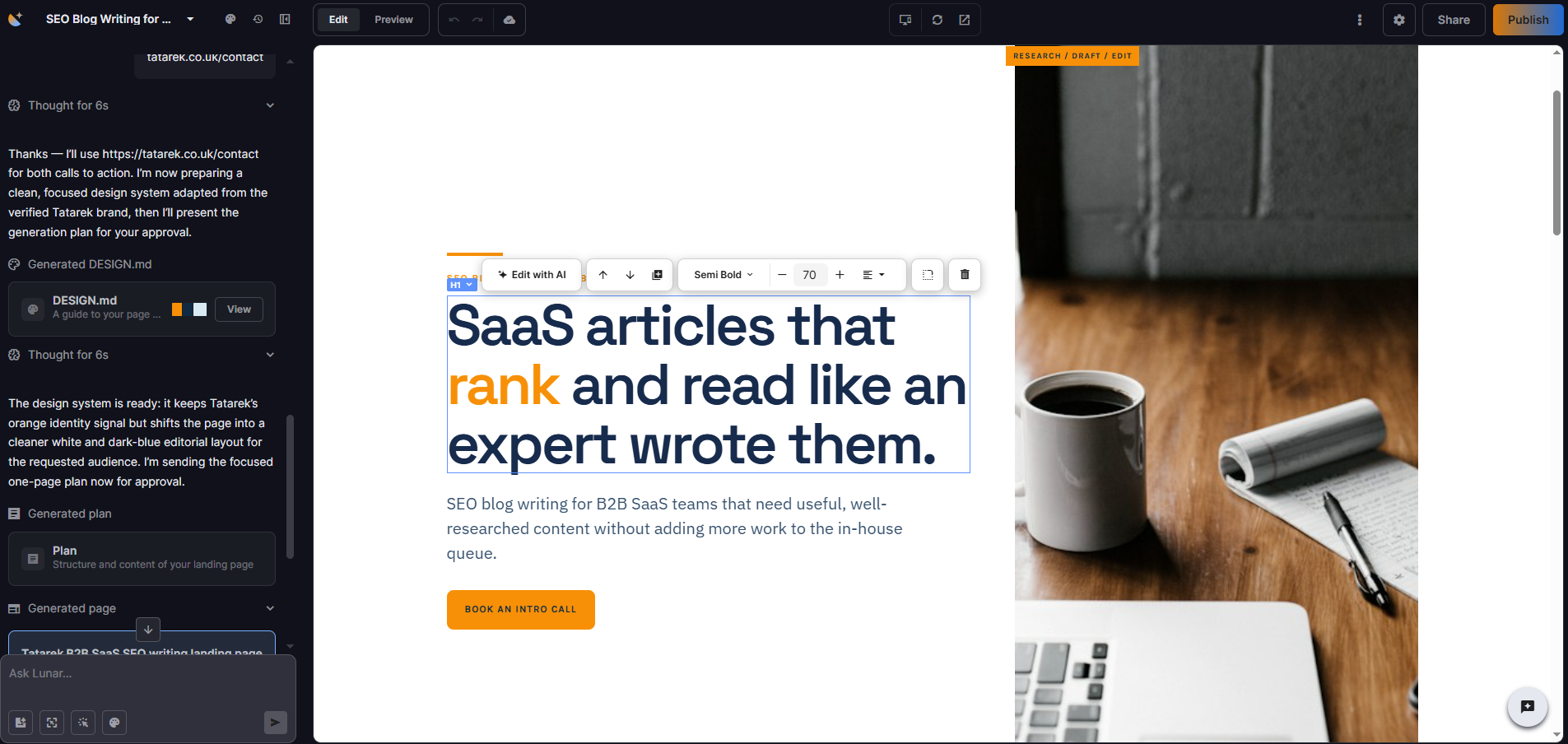
Landingi’s Lunar AI can create a landing page in minutes from a single prompt, or you can build and edit it manually inside the free-form drag-and-drop editor with 400+ templates.
Landingi A/B testing and analytics
A/B testing is available from the Optimize plan. You can run A/B/x variants with an even or custom split, but there’s no multi-armed bandit testing. You start and stop the test and choose the winner yourself.
EventTracker, also on Optimize and up, records clicks, forms, video starts, and scroll depth. Its Scroll Map and Event Map overlay that data on the page, and you can use any event as a conversion goal.
Landingi has no session recordings.
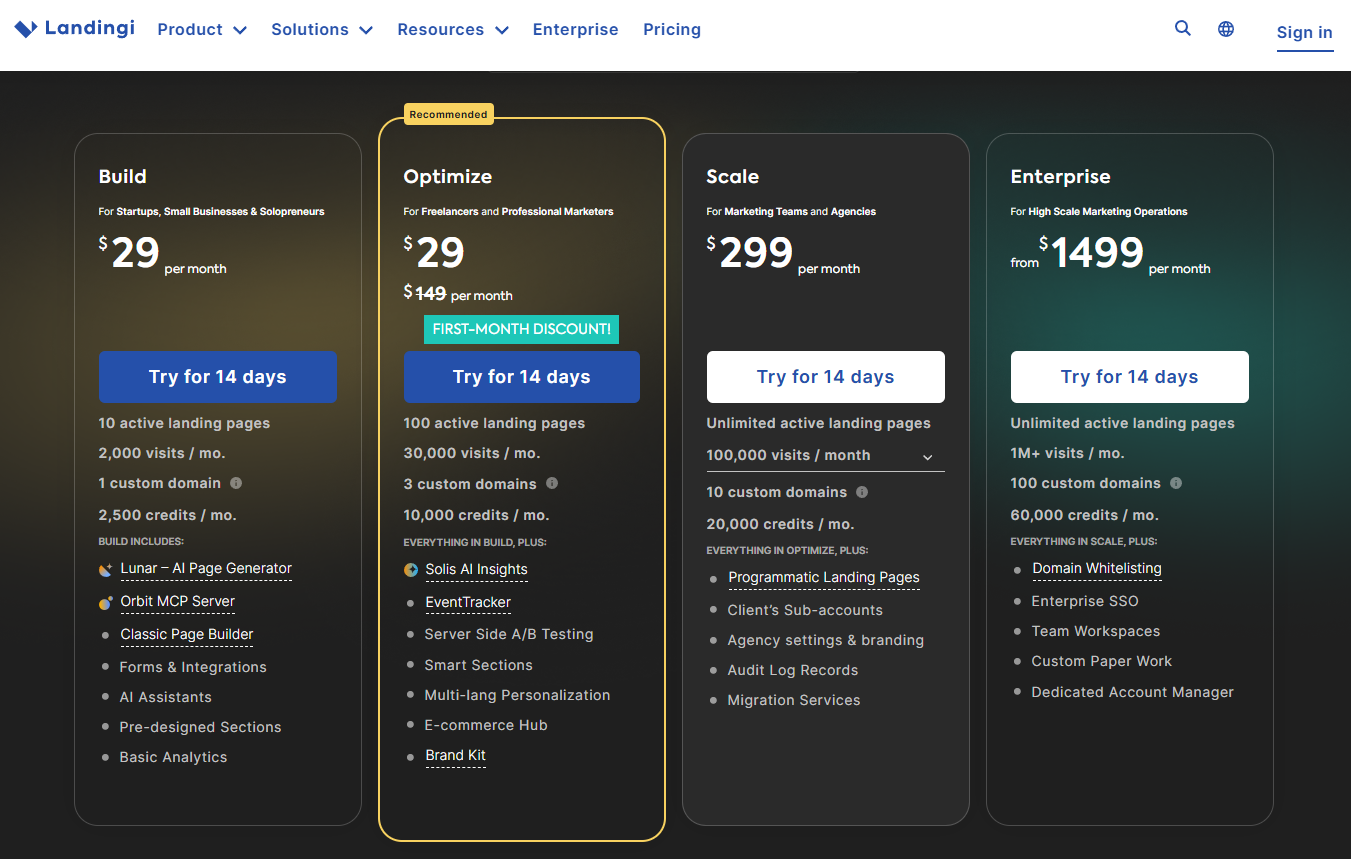
Landingi pricing
- Build: $24/mo ($29 monthly)
- Optimize: $119/mo ($149 monthly)
- Scale: $229/mo ($299 monthly)
- Enterprise: $1199/mo ($1499 monthly)
There is a 14-day free trial, limited to 200 visits, and no free plan.
What users say about Landingi
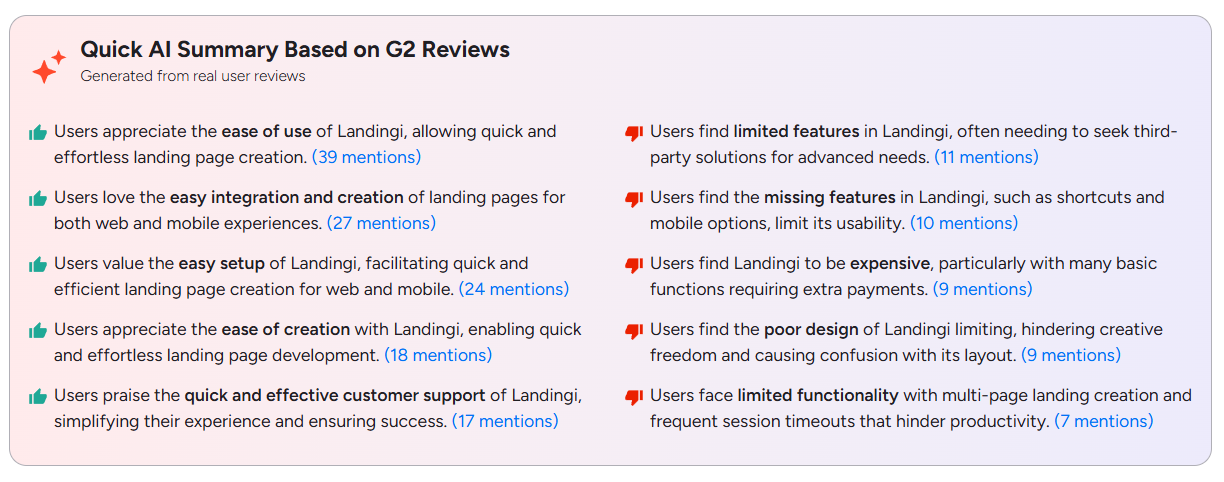
Landingi has a G2 rating of 4.5. Reported strengths include ease of use, quick setup, easy integrations, and fast support.
On the flip side, reviewers mention limited features that force users to pay for third-party tools, extra payments for basic functions, a confusing layout, and session timeouts.
5. Carrd: Best for low-cost one-page sites
Carrd is a basic landing page software that lets you build single-page sites.
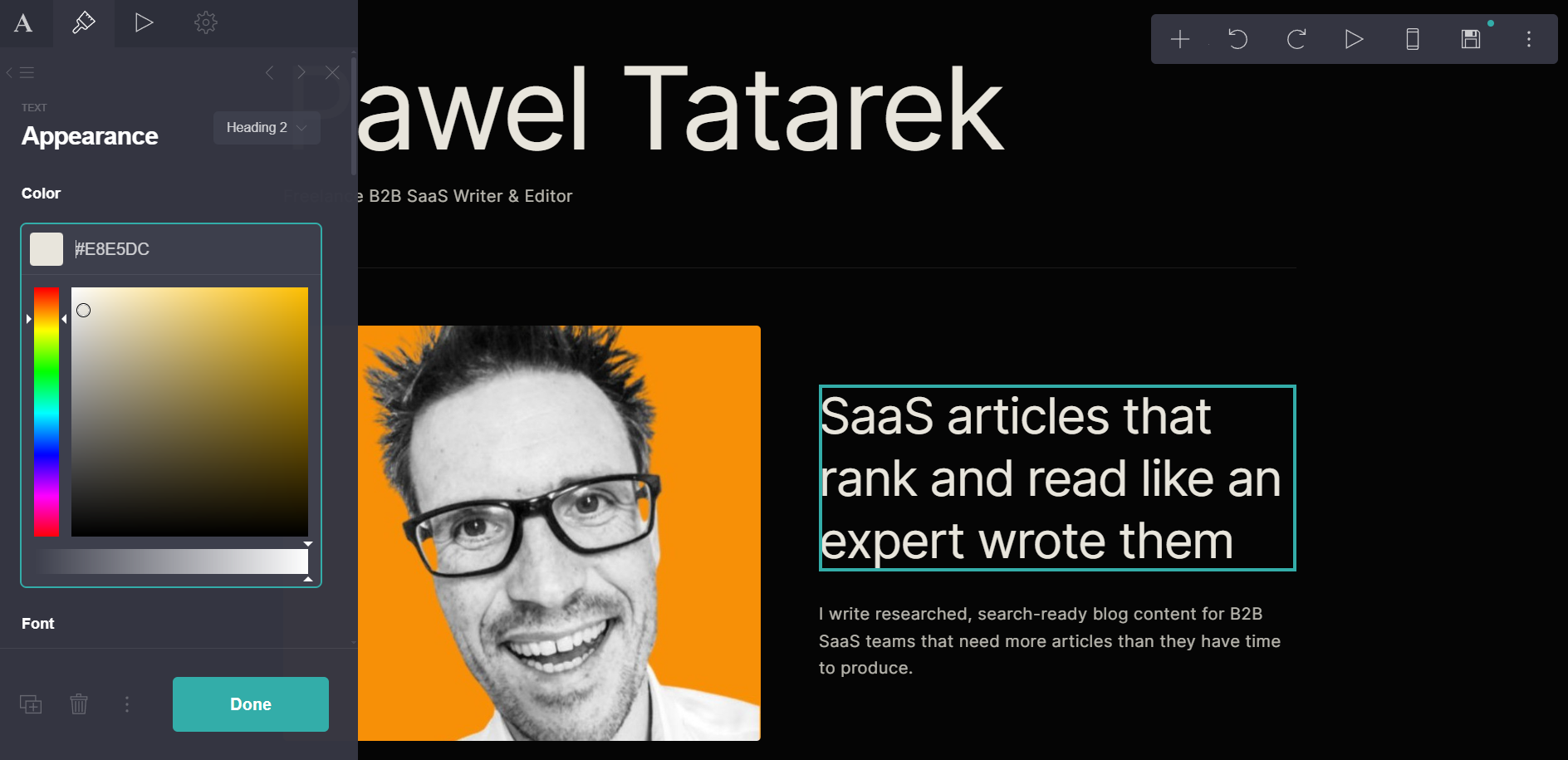
You create and optimize pages in a visual page editor by adding text, forms, and images, dragging them into place, and styling each one in a properties panel, either starting from a blank canvas or one of the dozens of templates.
There’s no AI page creation or editing, though.
Carrd integrates with 20 email marketing tools, including Mailchimp, Kit, HubSpot, ActiveCampaign, and Klaviyo, so leads captured via Signup forms get synced automatically (on Pro Standard and above). Pro Plus subscribers get custom forms that sync to Zapier, Make, n8n, or Airtable, plus Stripe payment forms.
Custom domains and custom code embeds are available on Pro Standard, while Pro Plus adds URL-parameter variables for personalizing text, redirects, password protection, and HTML download.
Carrd A/B testing and analytics
Carrd doesn’t offer A/B testing, heatmaps, or session recordings, and its native Analytics is rather basic. It reports page views over 24 hours, 7 days, or 30 days, but no unique visitors, conversions, or traffic sources.
For more detail, you can hook it up to Google Analytics, Matomo, PostHog, or other providers, or use Meta, LinkedIn, and TikTok trackers.
Carrd pricing
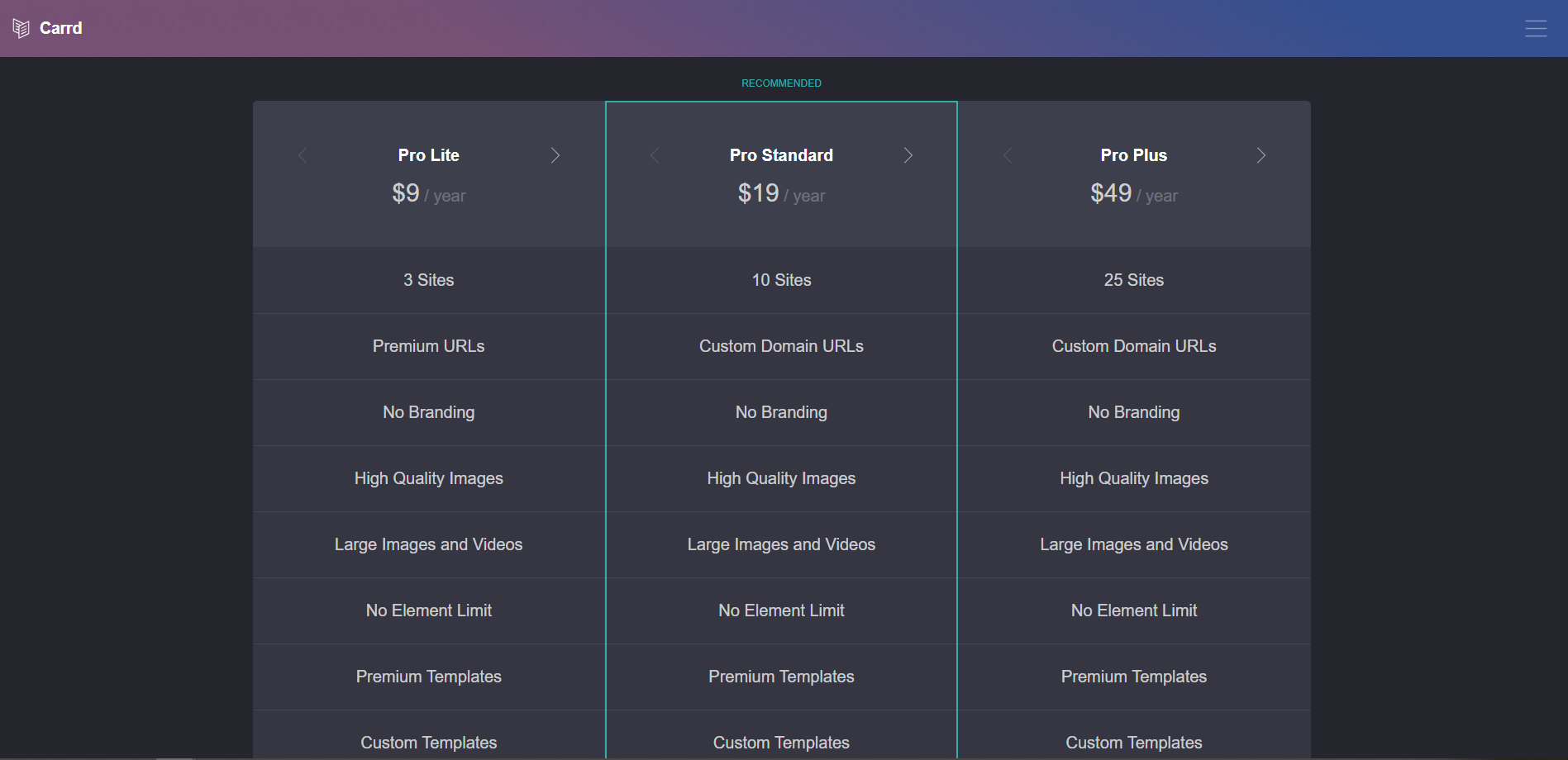
Carrd is the cheapest option on the list.
- Free: 3 sites with Carrd branding and no custom domain
- Pro Lite: $9 a year
- Pro Standard: $19 a year (10 sites, custom domain, forms, analytics)
- Pro Plus: $49 a year (25 sites, advanced forms)
Billing is annual only, and there is a 7-day Pro trial, no card required.
What users say about Carrd
Carrd has a G2 rating of 4.5, and reviewers praise how quick it is to build with and how little the paid plans cost.
The one-page limit is the most common complaint, followed by limited template variety (I must say they all kind of look the same), and a few reviewers find HTML editing difficult.
6. involve.me: Best for quizzes, calculators, and lead qualification
involve.me lets you integrate calculators, quizzes, and forms into multi-step landing pages that funnel visitors towards conversions.
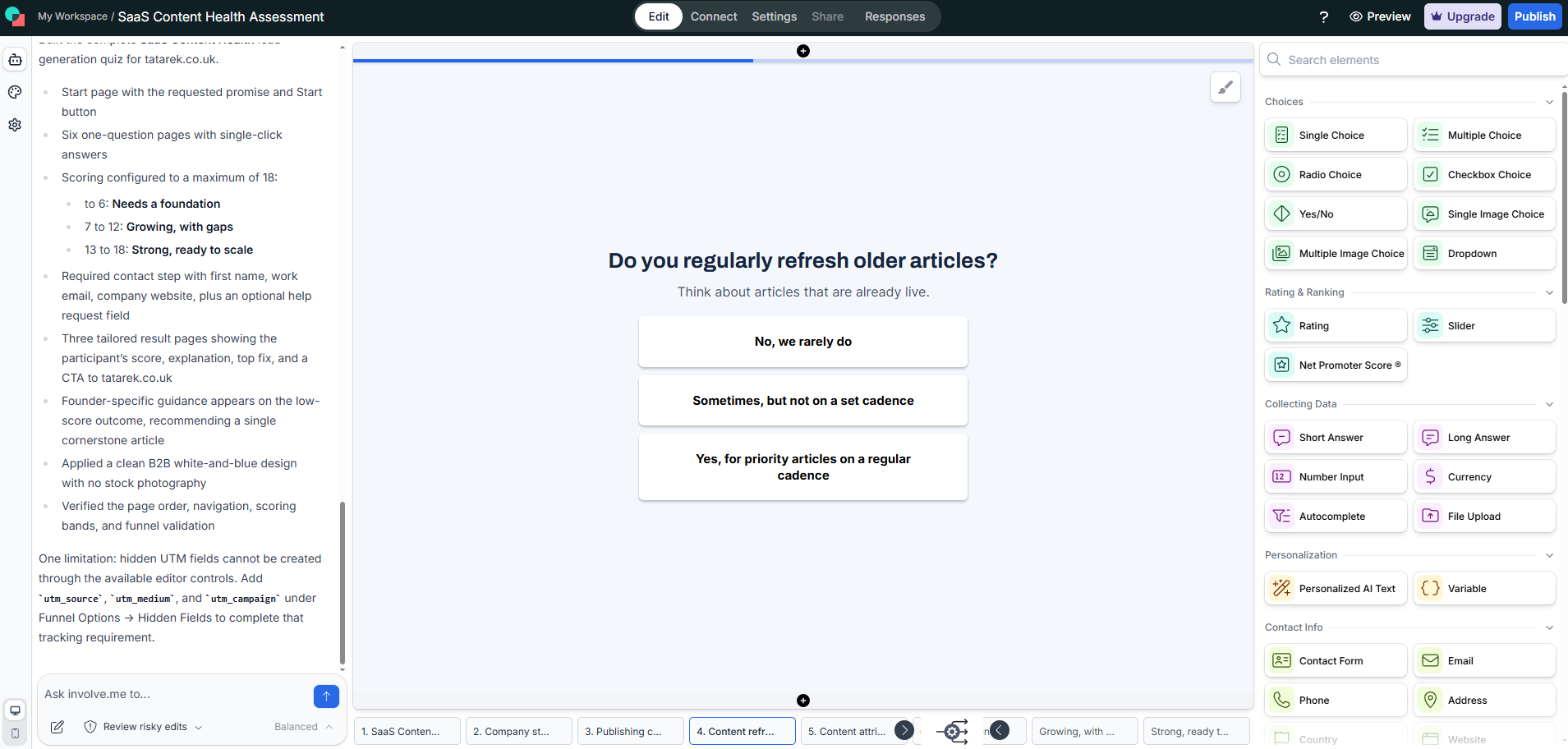
Conditional logic sends visitors to different pages based on their answers, and scoring adds up those answers. At the end, an outcome page shows each visitor a personalized result, and the tool stores the answers and scores submissions.
Thanks to integrations, each submission can go to Kit, Mailchimp, or MailerLite, or stay in the built-in CRM, which offers email automation.
You build the pages in a drag-and-drop editor with 300+ templates and fill each with elements such as questions, rating scales, contact fields, and calculators. Or you can let the AI Agent build or edit a funnel from a chat prompt.
You can publish a funnel as a standalone page, an iframe, or a pop-up, or embed it in WordPress with the plugin.
Finally, involve.me supports payment collection through Stripe, PayPal, and Square.
involve.me A/B testing and analytics
A/B testing, available on the Scale plan, shows two different funnels to visitors at random, and you roll out the winner yourself.
The summary tab on the analytics dashboard shows visits, submissions, completion rate, average time, and score. The Scale plan adds per-question drop-offs, which show where leads leave a funnel, plus device and country views.
GA4 and Meta Pixel work on all plans, though Free tracks page views only. Google Tag Manager support starts on Grow, and to use LinkedIn and TikTok pixels, you need the Scale subscription.
Unfortunately, there are no heatmaps or session recordings.
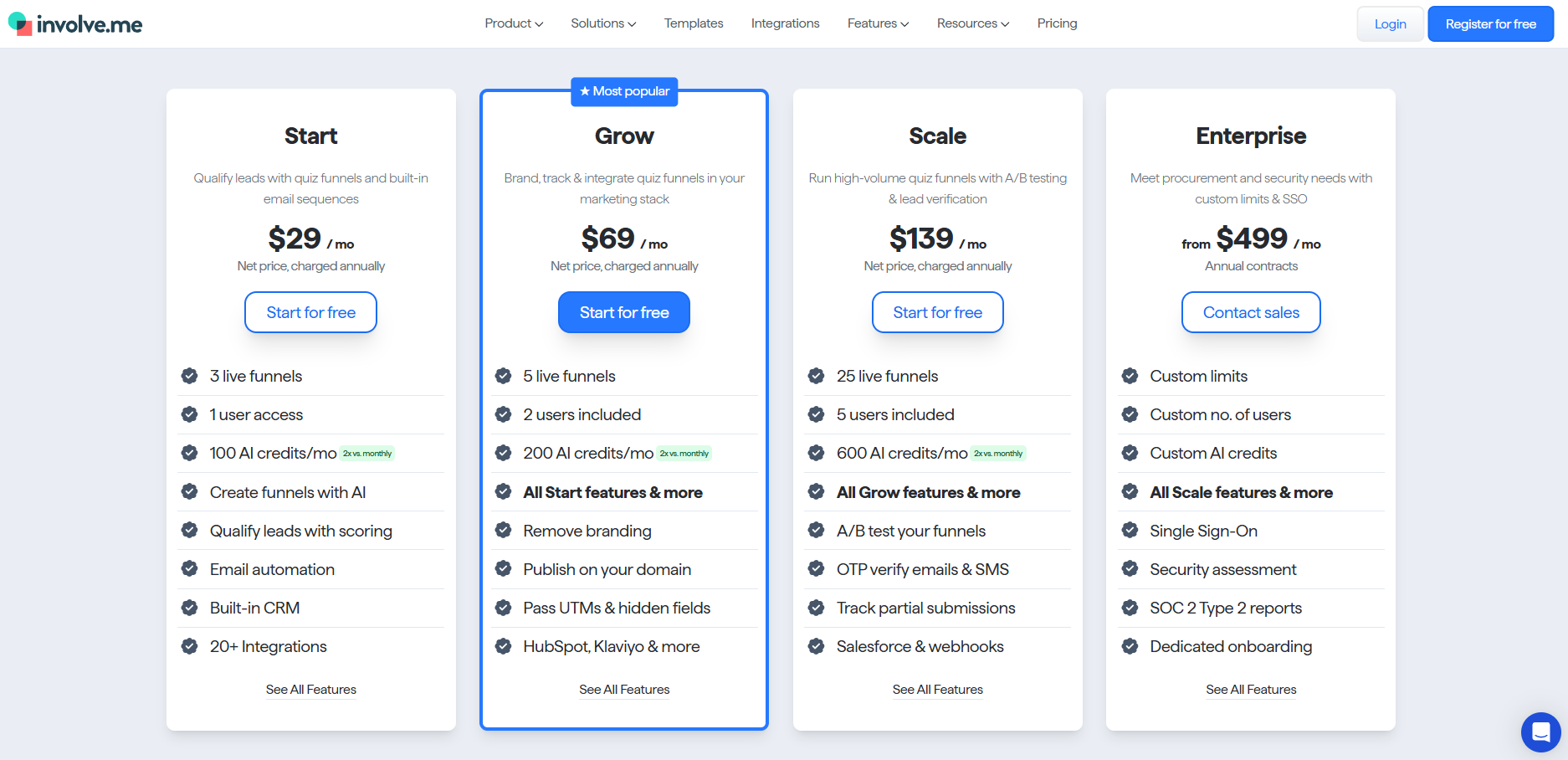
involve.me pricing
- Free: 50 submissions or 500 visits a month
- Start: $29/mo ($49 monthly)
- Grow: $69/mo ($99 monthly)
- Scale: $139/mo ($199 monthly)
- Enterprise: from $499 a month, on annual contracts
There is a 14-day free trial of any paid plan, with billing details required.
What users say about involve.me
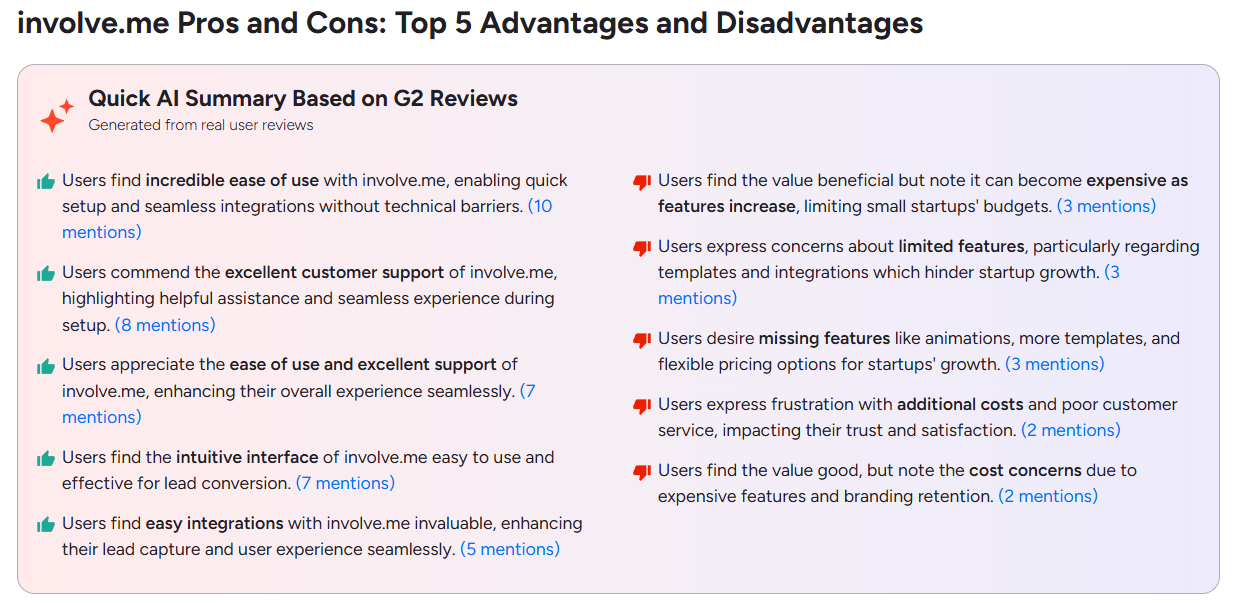
involve.me has a G2 rating of 4.7. Alongside ease of use and easy integrations, reviewers praise setup support.
Complaints center on cost, with pricier features and branding on lower plans, and on limited templates, integrations, and animations.
7. Kit: Best for growing an email list
Kit is an email platform, and its landing page tool helps you grow the mailing list that fuels your email marketing campaigns.
You build each page in a section-based editor, rebuilt in June 2026. Sections hold rows of up to four columns and content blocks, and you set the headings, text, buttons, and background for the whole page in a page-styles panel.
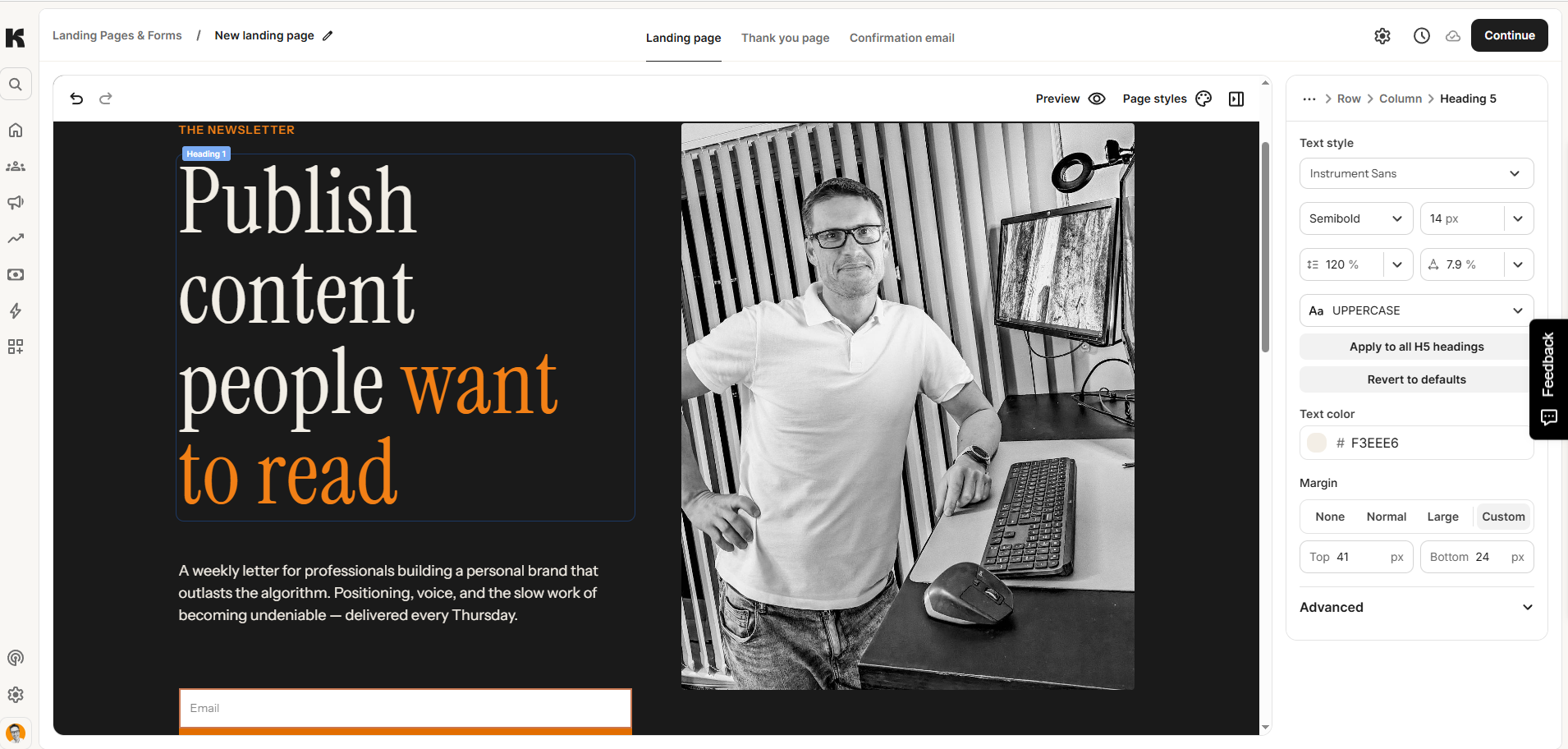
You get 20+ templates, including waitlists, lead magnets, webinars, and newsletter sign-ups. You can’t change the template after choosing it, but you can add custom CSS. Or connect an AI tool such as Claude through Kit MCP to create or customize landing pages (on Creator and Pro plans).
To automatically send a lead magnet or a welcome sequence, you need the visual automations and sequences that come with the Creator plan.
Kit hosts your pages at a yourname.kit.com address, and you can connect your own domain or subdomain on every plan, including Free.
Kit A/B testing and analytics
Kit has no A/B testing for landing pages, no heatmaps, and no session recordings (A/B testing applies to emails only).
Each page’s report shows visitors, subscribers, and conversion rate for the past 90 days, with referrer and UTM breakdowns.
You connect Google Analytics, Meta Pixel, Segment, Fathom, or Google Tag Manager by pasting an ID, though the Meta Pixel tracks page views only.
The Pro plan adds an Insights dashboard with attribution and subscriber journey analytics.
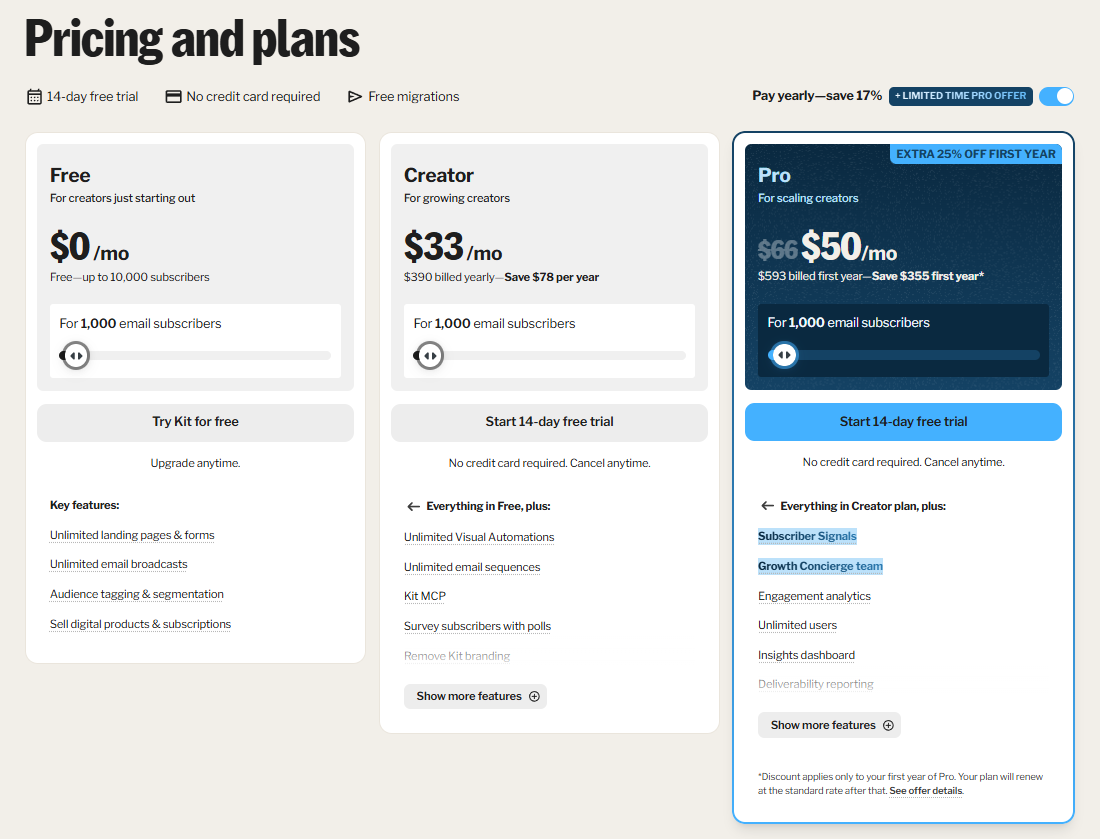
Kit pricing
- Free: up to 10,000 subscribers and unlimited landing pages & forms.
- Creator: $33/mo ($39 monthly) at 1,000 subscribers
- Pro: $50/mo ($66 monthly) at 1,000 subscribers
Prices rise with your subscriber count. There is a 14-day free trial of the paid plans with no card required.
What users say about Kit
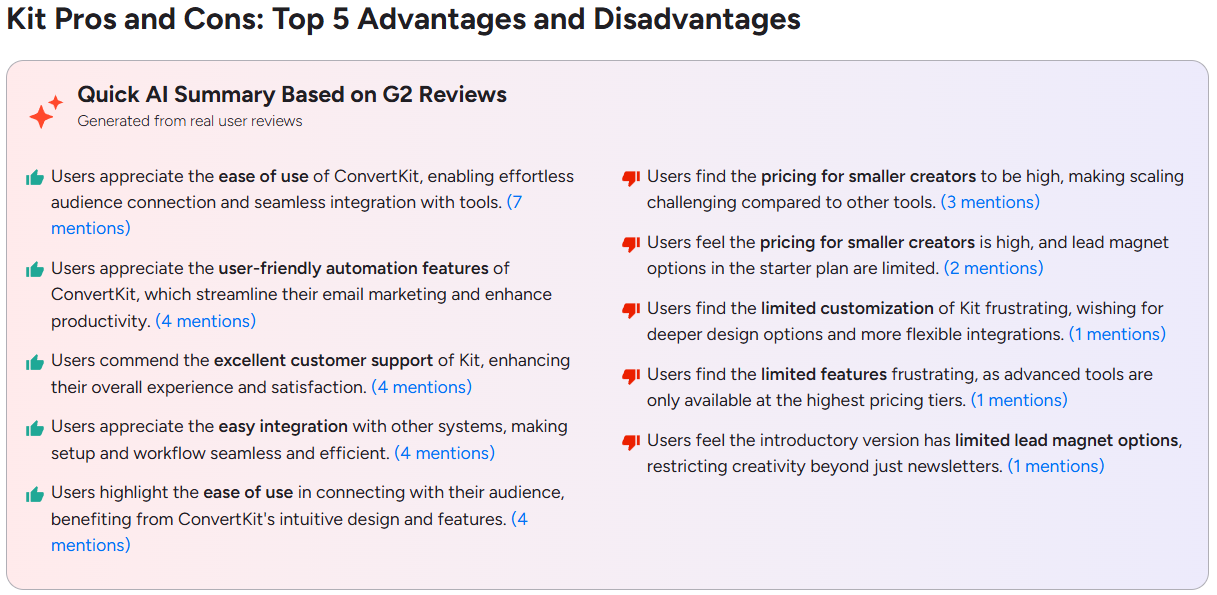
G2’s rating for Kit is 4.4, and it covers the whole email platform, not landing pages specifically.
Reviewers praise Kit for its ease of use, automations, support, and integrations. The complaints are about pricing for smaller creators, limited customization, and limited lead magnet options on the starter plan.
8. Wix: Best for landing pages inside a full site
Wix is a general website builder that lets you build a landing page using one of three editors: the Wix Editor, Wix Studio for agencies, or Harmony, an AI editor.
To build the page, you pick a landing page template, then set its layout to “No Header & Footer” to remove the menu. Templates come with forms and headings in place, or you can describe your campaign goal and let the AI generate the page.
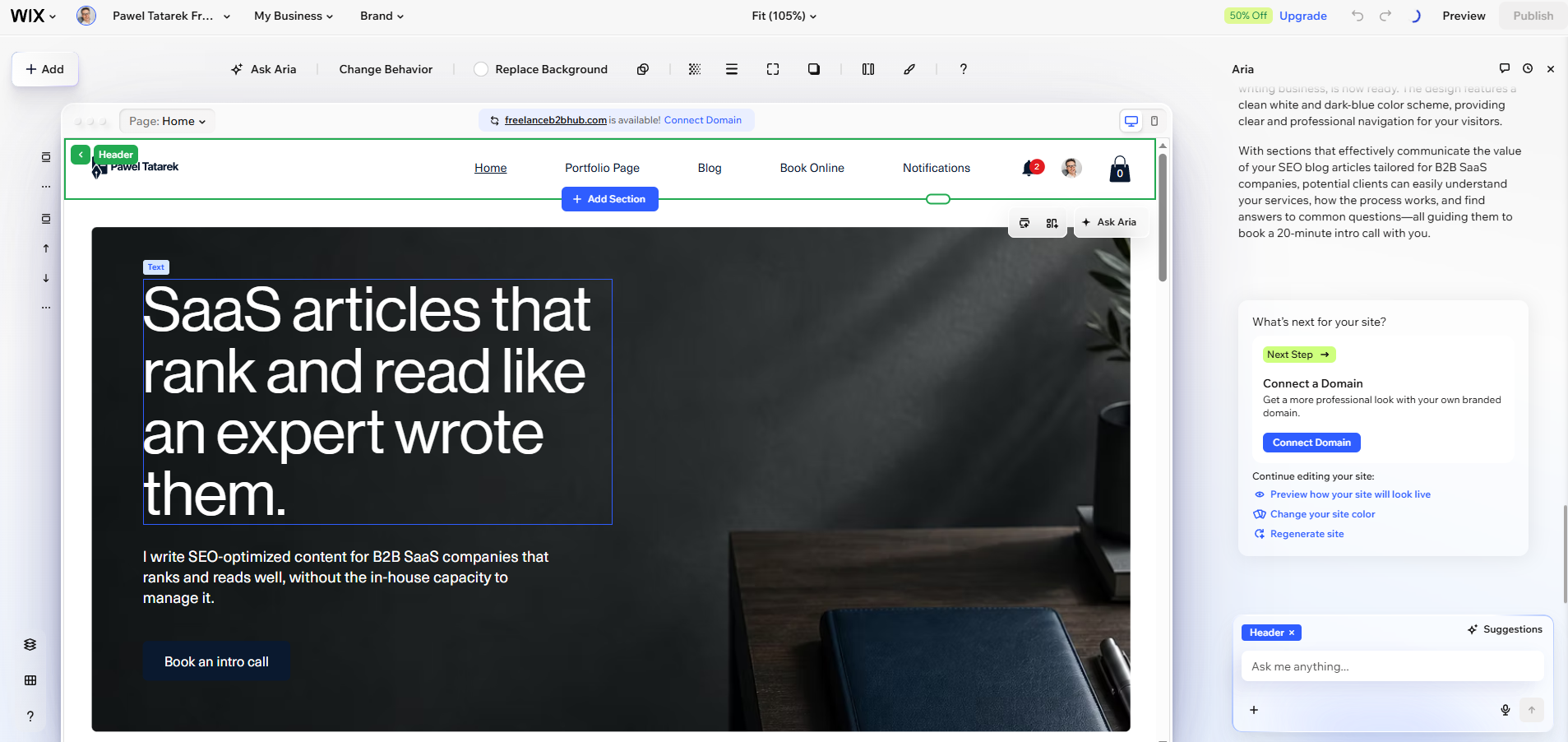
Forms can have multiple steps and conditions, and submissions go into Wix Contacts, the built-in CRM, where you can send them email campaigns.
Wix hosts everything, so you can’t export the page as HTML or embed it on another site.
Wix A/B testing and analytics
Wix runs A/B tests, allowing you to test various page versions.
Wix Analytics reports cover traffic, button clicks, form views, submissions, and completion rate, and marketing reports break results down by traffic source with a 30-day attribution window.
GA4, Google Tag Manager, Meta Pixel, and Custom Code integrations require a paid plan and a connected domain, and Wix has no native heatmaps.
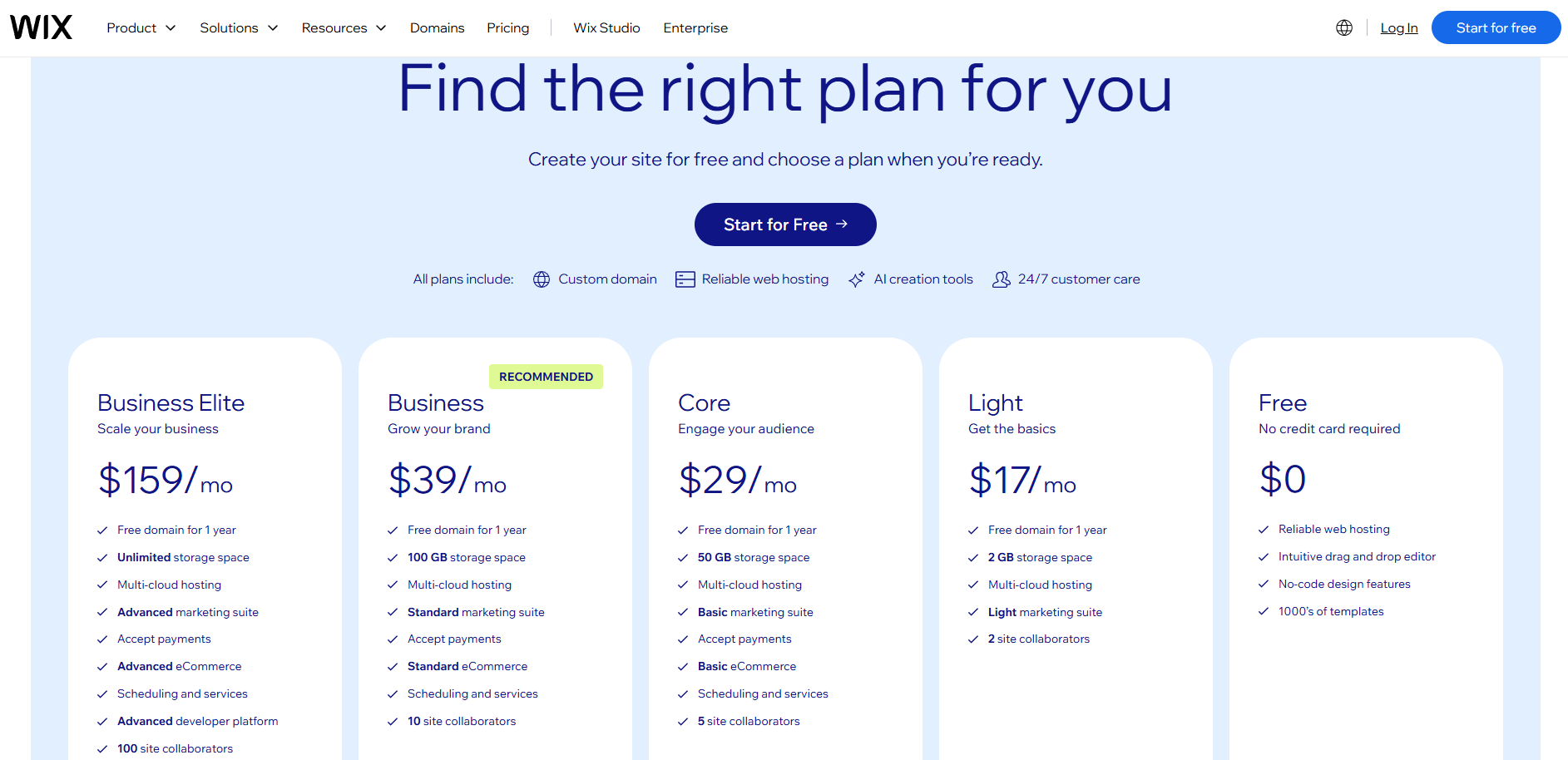
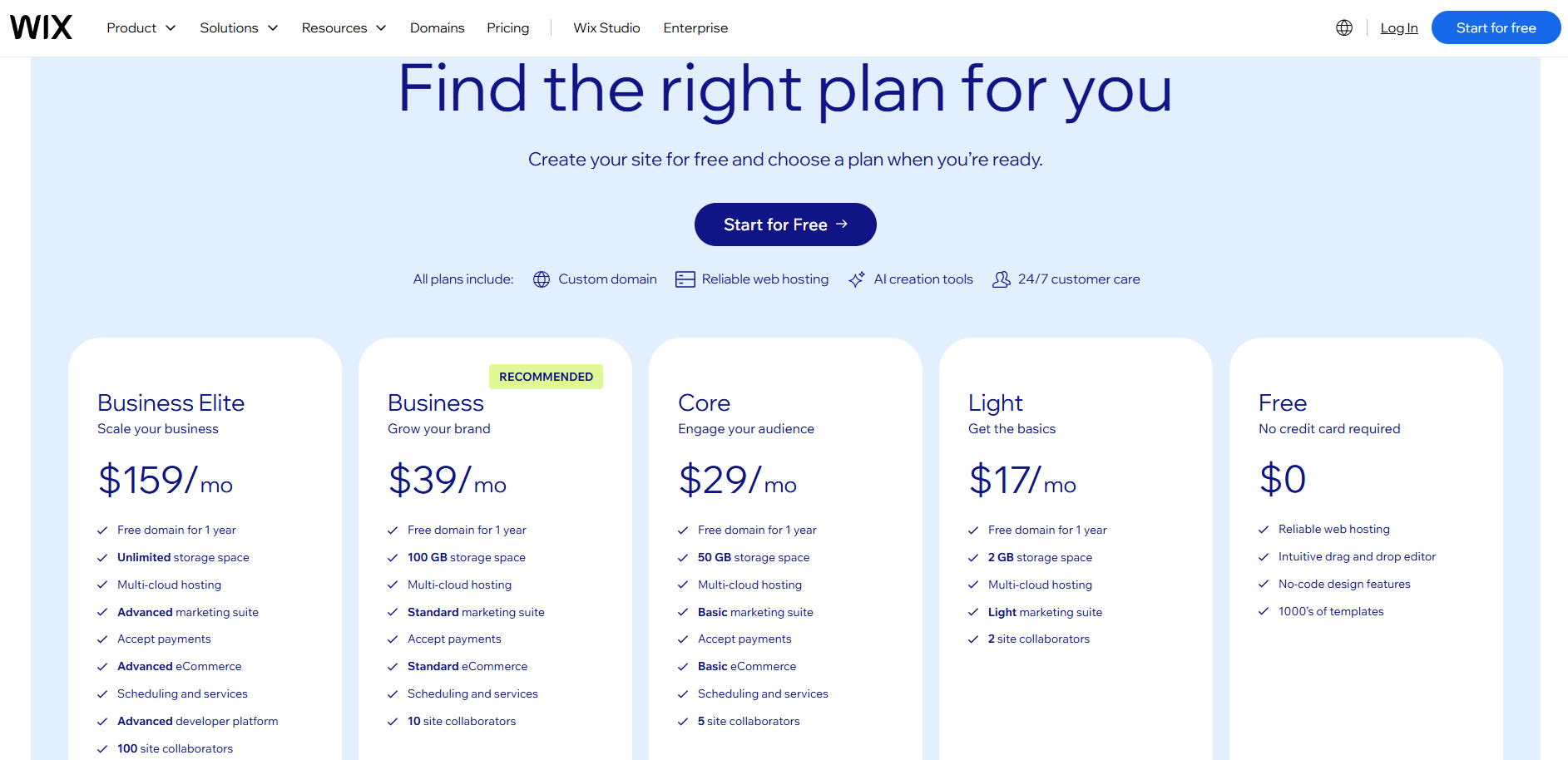
Wix pricing
- Free: on a wixsite.com address
- Light: $17/mo billed annually
- Core: $29/mo billed annually
- Business: $39/mo billed annually
- Business Elite: $159/mo billed annually
A custom domain needs a paid plan. Paid plans have no free trial, only a 14-day money-back guarantee.
What users say about Wix
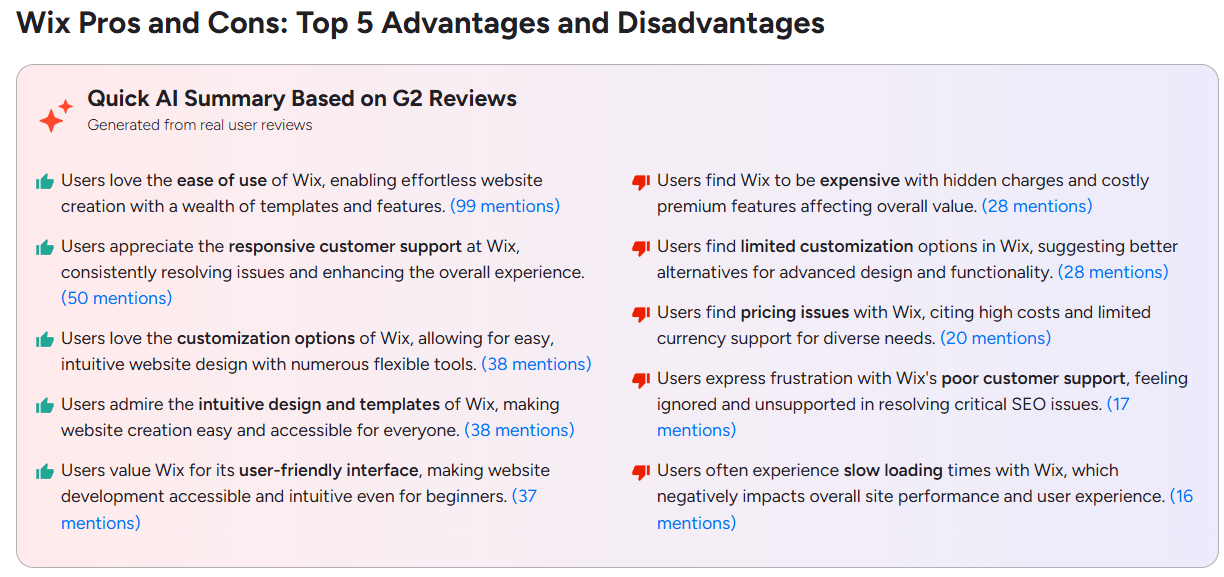
Wix’s G2 rating of 4.2 covers the whole website builder. Reviewers praise ease of use, support, and templates, and they are split on customization: some like the flexible tools, while others find the options too limited for advanced landing page design.
Recurring complaints are cost, with hidden charges and pricey premium features, and slow page loading.
Optimize Your Landing Pages With Crazy Egg
Crazy Egg doesn’t have a standalone page builder, but it has everything you need to optimize landing pages for better user experience and higher conversions.
Crazy Egg’s web, conversion, and funnel analytics let you track your landing page performance and find where visitors drop off. You analyze on-page user behavior with heatmaps (click, scroll, confetti, overlay, and list) and session recordings. All aided by automatic AI analysis.
Once you have your hypotheses, Crazy Egg’s A/B testing lets you build a variant in a visual editor, split traffic manually or with a multi-armed bandit, and set goals such as button clicks, form submissions, or ad pixel events.
Talk to Crazy Egg’s Sales team to see how heatmaps, recordings, and A/B testing can help build better-converting landing pages.
Landing Page Software FAQ
What is a landing page builder?
A landing page builder is software for creating and publishing a standalone page that serves a specific goal, such as a newsletter signup, a demo booking, or a purchase. It handles layout, forms, and hosting, and many builders also offer reporting, A/B testing, and integrations with commonly used analytics and marketing platforms.
Do I need a landing page builder or website builder?
Use a landing page builder when you want to build a one-page site for a freelancer or small business, or standalone pages to support specific marketing initiatives, like ad campaigns or webinar sign-ups.
Choose a website builder when you need multiple linked pages, a large blog, full content management, or a shopping cart.
What is the best landing page builder?
Instapage is the best landing page builder for teams running paid ads; Leadpages and Unbounce are great if you want A/B testing built into the editor, and Landingi is an excellent tool for teams running multiple pages. Kit is a good email marketing solution, while involve.me is a great choice if you want to gamify your landing pages, and Wix when you want a full website builder.
What is the best free landing page builder?
Kit offers the most generous free plan among all landing page builders on this list, with unlimited landing pages and a custom domain for up to 10,000 subscribers, with Kit branding. Carrd’s free plan covers 3 sites with Carrd branding and no custom domain. HubSpot’s free tools let you build up to 30 landing pages. GetResponse’s free plan covers 1,000 unique visits across all pages, and involve.me allows 50 submissions or 500 visits a month on its free plan.
What is the cheapest landing page builder?
Free plans aside, Carrd is the cheapest at $9 a year for Pro Lite. A custom domain, forms, and analytics start at Pro Standard, $19 a year.
If you need A/B testing, Leadpages Grow is the lowest at $79 a month, ahead of Unbounce Experiment ($112) and Landingi’s Optimize ($119).
Can you use AI to build landing pages?
Yes, you can use AI to build landing pages. Platforms like Instapage, Leadpages, Unbounce, and many more offer AI landing page builders that let you generate a page from a prompt.
Many landing page tools also support MCP, so you can draft, edit, and even publish pages from an AI assistant such as Claude or ChatGPT.
You can also vibe-code effective landing pages in popular tools like Loveable or Base44. In Crazy Egg’s test, a vibe-coded page converted 80.65% of visitors to signups against 55.68% for the human-designed page (on a sample of 124 and 176 visitors).
Do I need a website to have a landing page?
No, you don’t need a website to have a landing page. Instapage, Leadpages, Unbounce, Landingi, Carrd, involve.me, Kit, GetResponse, and HubSpot host a standalone landing page for you, on their own address or a custom domain you connect.
If you want a custom domain, Kit includes it in its free plan. Instapage, Leadpages, Unbounce, Landingi, Carrd, involve.me, GetResponse, and Wix all require a paid plan.
Should landing pages be indexed by search engines?
Index landing pages that are designed to attract organic traffic and offer unique, evergreen content.
Use the noindex tag for A/B testing variants, thank you pages, or if the page serves paid traffic, includes seasonal or time-sensitive content, or its content overlaps with other existing pages.

