
Your guide to make software spend optimization work for you


As your business scales, more and more SaaS applications are added to your tech stack, no spreadsheet can keep up with. That’s where a SaaS management platform comes in.
SaaS management platforms need to provide IT professionals visibility into their tech stack, automate permissions and processes, and provide valuable insights into software spending to identify underutilized resources and cost-saving opportunities.
What is software spend optimization?
Software spend optimization is the process of managing not only your spend on software, but your contracts, account usage, and compliance.
It involves:
- Tracking all SaaS applications in your tech stack
- Monitoring license usage and adoption
- Eliminating redundant tools
- Renegotiating contracts and reducing unused spend
Adapting a software spend optimization plan is easier said than done, so let’s dive into some common challenges you may face along the way, in addition to best practices that can make it work for your company.
Challenges surrounding software spend optimization
As you move toward a plan of optimizing your company’s software spend, here are some potential roadblocks that your team may experience.
Before you can optimize your software spend, you need to understand what you’re working with. That means building a complete picture of your SaaS environment.
In reality, that’s one of the hardest parts.
Software enters your organization through multiple channels:
- IT-led procurement processes
- Department-specific purchases
- Individual employees expensing tools on their own
Each of these pathways introduces applications into your environment—often without being fully tracked or approved.
The result is a SaaS footprint that grows faster than your ability to manage it.
It’s also common to discover that different teams are using different tools to solve the same problem. For example, your marketing team might rely on one project management platform while your sales team uses another. Both tools may offer nearly identical functionality, yet your organization is paying for both.
If your system of record is a spreadsheet, this problem only gets worse. Spreadsheets require manual updates, and in a fast-moving SaaS environment, they become outdated almost immediately. That means redundancies, unused tools, and inefficiencies go unnoticed.
30% of software tools are idle or underutilized.
Source: G2
Lacking visibility into which software is even being used
Even if you manage to build a list of all your applications, that’s only half the battle.
The next question is: Are people actually using them?
Some applications integrate with single sign-on (SSO), making it easier to track user activity and access. But many don’t. And when tools fall outside your identity provider, visibility drops significantly.
This creates blind spots:
- You don’t know who has access
- You don’t know who is actively using the tool
- You don’t know whether the software is delivering value
When you combine this with employee-expensed tools, the problem compounds. Entire applications can exist outside IT’s awareness, making it nearly impossible to enforce governance or evaluate ROI.This is where shadow IT becomes a major obstacle. Not only does it increase security risk, but it also makes cost optimization far more difficult because you’re working with incomplete data.
Misunderstanding how to manage software footprint
Many organizations treat software optimization as a once-a-year exercise.
They review their stack during budget planning, make a few cuts, renegotiate a few contracts, and then move on.
The problem? SaaS doesn’t operate on an annual cycle.
Applications are constantly being added, usage fluctuates, and employee needs evolve. A yearly review simply isn’t enough to keep up.
This raises important questions around utilization:
- What percentage of employees should be using a given tool?
- Is partial adoption acceptable?
- When does underutilization become waste?
For critical tools, you’d expect usage to be close to universal. If only 60% of employees are using a tool that’s essential to daily workflows, something is off—either in adoption, training, or tool selection.
Without continuous monitoring, these issues remain hidden until renewal time—when it’s often too late to act effectively.
Not knowing whether employees actually like the tools
Usage data tells you what is happening, but it doesn’t tell you why.
An application might show moderate usage, but that doesn’t mean employees are happy with it. In many cases, people use tools simply because they have to—not because they’re effective or enjoyable.
When employees dislike a tool:
- Productivity decreases
- Workarounds emerge
- Alternative tools get introduced
This is one of the biggest drivers of duplication within a SaaS stack.
If your team isn’t satisfied with the tools they’ve been given, they’ll find their own solutions. And while that may solve short-term problems, it creates long-term complexity and cost.
Understanding employee sentiment is a crucial, but often overlooked component of software spend optimization.
License management becomes next to impossible
When various teams are lacking visibility into all of the areas listed above, it makes it increasingly difficult for your organization to rightsize your licenses.
It’ll be a common occurrence for your organization to pay for licenses for software applications that aren’t necessarily being used to their full potential. Additionally, you’ll end up unnecessarily paying for licenses for specific tools that have the same functionality and features as other applications within your tech stack.
Best practices for making software spend optimization work
Now that you’re fully aware of the challenges that can occur when building a software spend optimization strategy for your company, let’s dive deeper into the best practices that will help you make it work for your organization.
Start by eliminating redundant tools
If you want to make the necessary moves to get a handle on shadow IT, you must eliminate redundant tools within your tech stack. For that, you need a system of record that has a primary objective of providing full visibility into your application portfolio. A spreadsheet isn’t the answer for this.
BetterCloud is that system of record. Because it connects to multiple areas of your organization, like ERP systems, accounting systems, single sign-on systems, and various applications themselves, your team will have access to unparalleled visibility into your company’s software footprint, as well as its usage.
Use benchmarking to guide decisions
Data becomes far more powerful when you have context.
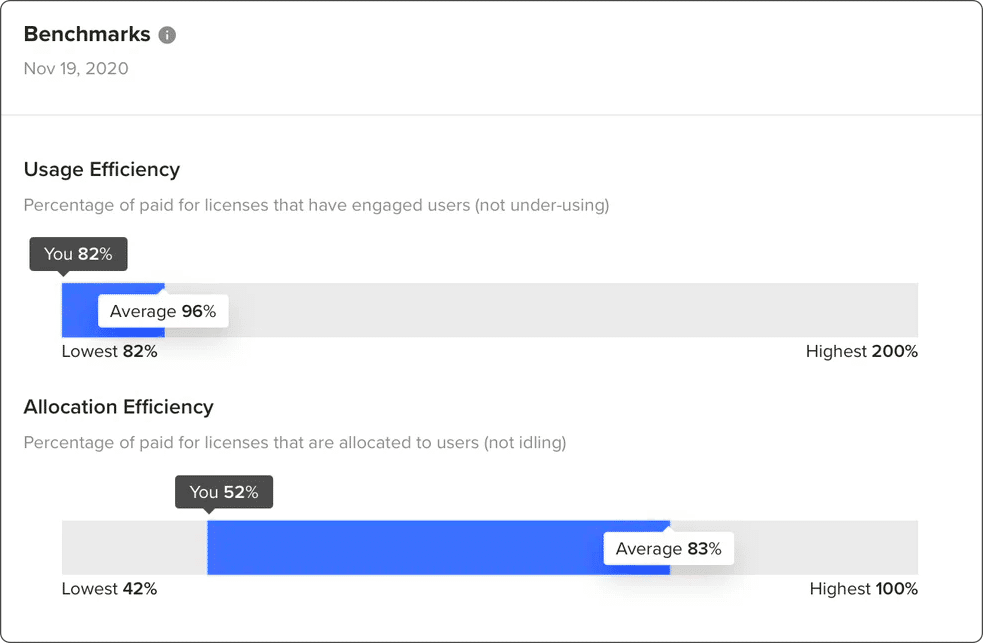
Benchmarking allows you to compare your software usage against similar organizations, helping you understand whether you’re over- or under-performing.
Two key metrics to track include:
- License allocation efficiency (How many purchased licenses are actually assigned)
- Engagement efficiency(How many assigned licenses are actively used)
As an example, let’s say your business has purchased 1,000 licenses for SOFTWARE X and has made the necessary moves to allocate 800 of these licenses. BetterCloud would show you that your “license allocation efficiency” is 80%.
Taking this even further, let’s say that out of these 800 licenses that are allocated, 600 of them are actively being used. That means, 600 employees are logging in and using the software as they deem necessary, giving SOFTWARE X an “engagement efficiency” score of 75.
BetterCloud will then benchmark these efficiencies against companies similar to yours, allowing you to become informed on how you stand in regards to your competition.
Understand the business value of each application
In order to obtain a complete understanding of the value your organization is getting out of its applications, you need to go straight to the source: your employees.
BetterCloud is the only SaaS system of record on the market that allows you to collect user sentiment data surveys to your employees pertaining to all applications, which helps to maintain all of your data within a single source of truth in real time.
Within just a few minutes, you can configure employee pulse surveys that can be sent to employees on a quarterly, semi-annually, or annually basis to poll your team on whether they like the software they’re using and if it’s critical for their job and responsibilities.
Data will be compiled from these surveys and will be broken down by:
- Replace or retrain: Software within this sentiment summary are tools that employees believe to be critical to their daily responsibilities, but don’t necessarily enjoy using.
- Consider eliminating: Software that is disliked by employees and considered to be noncritical.
- Re-negotiate pricing: Software that employees will say they love to use, but don’t find critical to their daily tasks. Take a look at the license and cost of the tool. Before the contract is renewed, consider renegotiating the cost or lowering license counts.
- Keep and expand: Software that is both loved and critical, making it a must-have tool that needs to be used for the long-term. It’s in your best interest to move these applications onto a multi-year contract.
These surveys take no more than a few clicks for your employees to complete, making it simple to get feedback while assigning an informed choice on which applications to get rid of and which to keep.
Implement a renewal calendar
There are a lot of key details regarding a software contract that you need to be aware of, one of which being when it’s set to renew.
If you find that you’re consistently missing or forgetting details regarding the renewal date, your team is likely faced with unwanted renewals and unnecessary costs. Even worse, your employees could be stuck using a tool that they don’t find critical to their job, or even enjoy using, and your department could go way over what you have set in place for your software budget.
To ensure a software renewal doesn’t take you by surprise, it’s in your company’s best interest to take advantage of a renewal calendar put in place by a tool like BetterCloud.
Its comprehensive and easy-to-read dashboard is where all of your contacts are housed and stored, so you can always be aware of how long you have until contracts are set to renew or expire, how each vendor requires notice, as well as alerts and reminders of when contracts are approaching their renewal date. Plus, if a contract owner leaves your company, BetterCloud puts an alert next to their name so you can reassign the contract to a new owner to keep on top of all details.
Streamline and save
A lot goes into making software spend optimization work for your company. BetterCloud is here to help eliminate unnecessary spending and make smarter choices with how you allocate your budget. Schedule a demo today to get started.

