
How to build customizable access workflows for SaaS apps

SaaS sprawl has become a logistical nightmare to say the least. For IT admins, managers, and procurement teams, the challenge isn’t just buying the right tools; it’s ensuring that the right people have the right access at the right time without drowning the help desk in manual tickets.
The traditional manual approach to access management – spreadsheets, manual provisioning, and “shoulder-tap” requests – is a recipe for security gaps and operational friction. To scale, organizations need a way to build customizable access workflows that operate on autopilot.
Enter BetterCloud. By centralizing control and automating the “connective tissue” between your ticketing systems, identity providers, and SaaS applications, BetterCloud allows IT to transform access from a bottleneck into a competitive advantage.
The problem: The high cost of manual access
Before we dive into the “how,” let’s look at the “why.” Manual access management creates three primary pain points:
Building the foundation
The first step in building a world-class access workflow is knowing what you have. In a sprawling SaaS ecosystem, “shadow IT” and forgotten licenses aren’t just budgetary nuisances, they are significant security blind spots. You cannot secure or automate what you cannot see.
This is where BetterCloud becomes the cornerstone of your strategy. Rather than hopping between dozens of individual admin consoles to piece together a picture of your environment, BetterCloud centralizes your entire stack into a single, cohesive view.
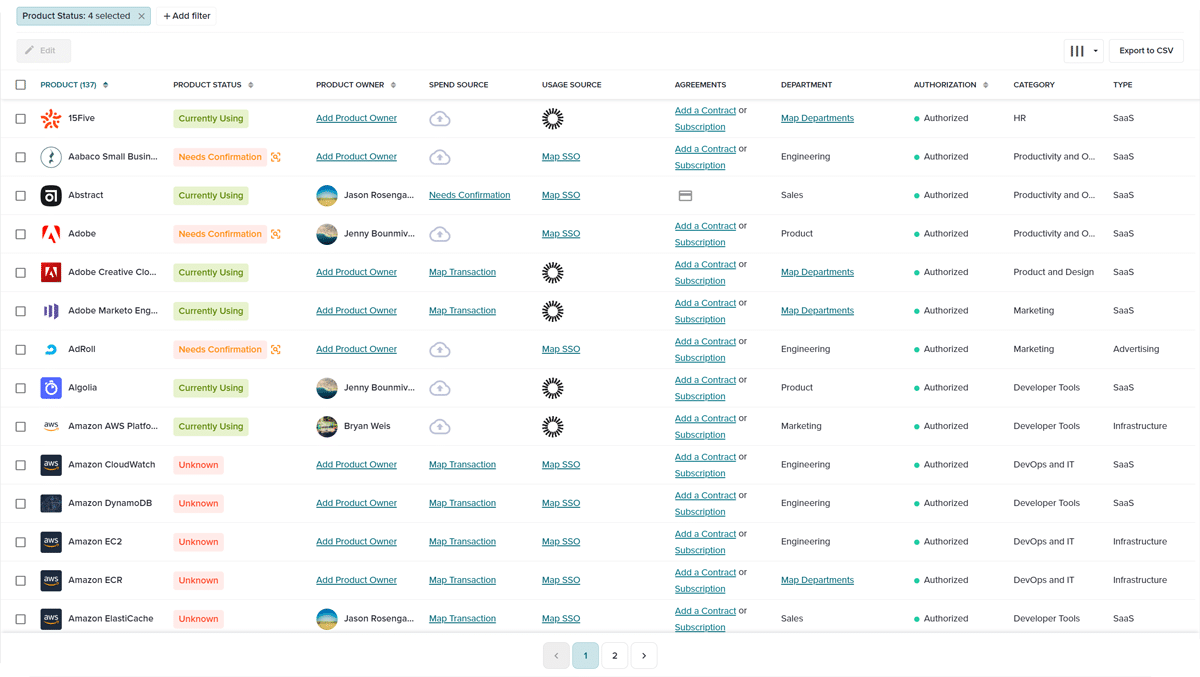
- Discovery and inventory: Automatically identify every managed and unmanaged application within your network.
- User-centric insight: See exactly who has access to what, when they last logged in, and what level of permissions they hold across different platforms.
- Real-time monitoring: Move beyond static spreadsheets. BetterCloud provides a living pulse of your SaaS health, alerting you to over-privileged users or dormant accounts before they become liabilities.
By establishing this foundation of visibility, you move from a reactive “firefighting” stance to a proactive architectural one. With a clear map of your SaaS landscape, you are no longer just managing software—you are orchestrating a secure, scalable digital workplace.
Step 1: Triggering workflows from multiple endpoints
The beauty of a customizable workflow is that it doesn’t force users to change their behavior. BetterCloud allows you to trigger access workflows from the places where work already happens.
1. Ticketing systems (Jira, ServiceNow, Zendesk)

Most organizations already use an ITSM. BetterCloud can “listen” for specific ticket types. For example, when a user submits a Jira ticket requesting “Adobe Creative Cloud,” BetterCloud identifies the requestor and the app, then automatically initiates the approval and provisioning chain.
2. The BetterCloud Self-Service Agent
To achieve true “zero-touch” IT, you can bypass the ticket queue entirely. The BetterCloud Self-Service Agent allows employees to request software directly within Slack or Microsoft Teams.
- A user interacts with a friendly bot.
- The bot presents a list of approved apps from your catalog.
- The user selects the app, and the workflow takes over.
Step 2: Intelligent logic (Titles, departments, and groups)
A “one-size-fits-all” access policy is dangerous. A marketing manager needs different tools than a DevOps engineer. BetterCloud’s workflow builder uses If/Else logic and dynamic attributes to grant access based on a user’s identity.
Department-based provisioning
You can configure a workflow to automatically grant access to Salesforce and HubSpot the moment a new user is added to the “Sales” department in your HRIS (like Workday or BambooHR).
Title-based entitlements
Using attributes like “Title,” you can ensure that only “Senior Designers” get access to the most expensive Figma seats, while “Junior Designers” are provisioned with view-only or standard seats. This granular control is a dream for procurement teams looking to optimize SaaS spend.
Step 3: The “Wait for Approval” step
Customization means having the ability to add a human touch where it’s needed. Not every request should be auto-granted. BetterCloud allows you to insert an Approval Step into any workflow.
When a request is triggered, BetterCloud can send a Slack message to the user’s manager: “John Doe is requesting a Pro license for Zoom. Do you approve?” Once the manager clicks “Approve,” BetterCloud immediately provisions the account. If denied, the ticket is closed with an automated notification to the user.
Step 4: The mid-lifecycle “delta”
Access workflows aren’t just for day one. One of the most overlooked challenges is the mid-lifecycle change. By implementing a scalable SaaS access review workflow, you can ensure that permissions evolve alongside the employee.
When an employee moves from Finance to Marketing, they shouldn’t keep their access to the company’s banking portal.
BetterCloud workflows can be set to trigger on “Department Change.” The workflow will:
Why IT managers and procurement love this approach
For IT Managers, this means a massive reduction in “tier 1” support tickets. Your team stops being “the people who create accounts” and starts being “the people who build the systems that create accounts.”
For Procurement, the ROI is immediate. By automating the reclamation of licenses during department changes or offboarding, BetterCloud ensures you aren’t paying for “ghost” licenses. You gain a clear audit trail of who has access to what, making compliance and renewals a breeze.
Summary: A roadmap to automated access
Building a customizable access workflow doesn’t require a team of developers. With BetterCloud’s no-code platform, the steps are clear:
The result is an IT department that scales as fast as the business, a secure environment where access is tightly controlled, and a workforce that has exactly what they need to succeed—without the wait.
Stop being the help desk, Start being the architect
At the end of the day, managing a modern tech stack shouldn’t feel like a second full-time job of manual data entry. You need a way to bring order to the chaos without adding more complexity to your plate.
BetterCloud is the definitive solution for customizable access workflows, giving you the flexibility to build a system that fits your team’s specific needs rather than forcing you into a box. Think of it as the SaaSOps operating system—the central hub that keeps your applications, users, and security policies running in perfect sync.
By automating the heavy lifting, you’re not just closing tickets faster; you’re building a more secure, scalable, and employee-friendly workplace.
Book a demo today.
FAQs
What is “SaaS sprawl,” and why is it a problem?
SaaS sprawl occurs when an organization uses a vast, often unmanaged, array of cloud applications. It creates a “logistical nightmare” for IT and procurement because manual tracking leads to security gaps (orphaned accounts), productivity loss (waiting for access), and wasted spend (redundant or unused licenses).
How does BetterCloud solve access management challenges?
BetterCloud acts as the “connective tissue” between your identity providers, ticketing systems, and SaaS apps. It replaces manual spreadsheets and “shoulder-tap” requests with automated, customizable workflows that handle provisioning and deprovisioning on autopilot.
Can BetterCloud help me find shadow IT?
Yes. BetterCloud identifies unsanctioned or “shadow” apps that aren’t managed by IT. This allows you to either bring them under official management or sunset them to reduce security risks and costs.
Will my IT team need to write code to use BetterCloud?
No. BetterCloud is a no-code platform. IT admins can build complex, automated workflows using a visual builder, allowing them to move from “ticket takers” to “system architects.”
How can I build a scalable SaaS access review workflow?
BetterCloud enables you to build these workflows by combining real-time discovery with automated logic. Instead of manual quarterly audits, the platform continuously reviews user attributes and triggers actions, like deprovisioning or approval requests, whenever a user’s status changes.

